LiveChat
  Support
SSL Implemented Meaning: What It Really Means When a Site Has HTTPS Enabled
When someone says “SSL is implemented” on a website, they mean one specific thing: an SSL/TLS certificate is installed and active on the server, so the site serves its pages over HTTPS instead of plain HTTP. In practical terms, the address bar shows `https://`, a padlock icon appears next to the URL, and the browser stops flagging the page as “Not secure.” The certificate does two jobs at once — it encrypts the traffic moving between the visitor’s browser and your server, and it authenticates the identity of the site, proving that visitors are connected to the real thing and not an impostor.
That is the short answer. But “implemented” hides a trap that catches even experienced site owners, and understanding it is the difference between a site that is *truly* secure and one that only looks half-secure. Let’s break down exactly what “SSL implemented” means, how to tell it’s done, and where the common failure point lives.
Key Takeaways
• “SSL implemented” means a TLS certificate is installed and active, so the site serves over HTTPS with the padlock and no “Not secure” warning.
• SSL does two things: encrypts data in transit and authenticates the site’s identity.
• The signs are simple: the URL begins with `https://`, a padlock appears, and there is no browser warning.
• Installing the certificate is necessary but not sufficient. A site can have a valid cert and still be insecure if it isn’t *fully* switched to HTTPS.
• Mixed content is the classic trap — one resource loaded over `http://` breaks the clean padlock even when the certificate is perfect.
• True implementation is a checklist, not a switch: install the cert, force HTTP→HTTPS redirects, fix mixed content, and update internal links and canonicals.
What does “SSL implemented” actually mean?
“SSL implemented” is shorthand for: *an SSL/TLS certificate has been installed on the website and is actively serving traffic over HTTPS.* (The protocol is technically TLS now — modern “SSL” is really TLS — but the name SSL stuck, so the two terms are used interchangeably.)
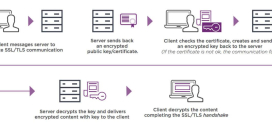
When SSL is implemented, here is what happens behind the scenes every time a visitor loads a page:
- The browser requests a secure connection to your server.
- Your server presents its SSL certificate, which contains a public key and is signed by a trusted Certificate Authority (CA).
- The browser verifies the certificate is valid, trusted, and matches your domain.
- The two sides negotiate an encrypted session, and all data from that point travels scrambled.
The visible result is the padlock. Everything a visitor types — passwords, payment details, contact forms — now travels as ciphertext that an eavesdropper on the network cannot read.
For a fuller walkthrough of how this handshake and trust chain work, see our .
What does SSL actually do once it’s implemented?
It’s worth separating the two distinct jobs, because people often think SSL is “just encryption.”
1. Encryption (confidentiality). SSL encrypts the data in transit between browser and server. Without it, anyone sharing the network — a coffee-shop Wi-Fi router, an ISP, a malicious intermediary — can read everything sent in plain text. With it, that traffic is unreadable.
2. Authentication (identity). The certificate is issued by a Certificate Authority that vouches for your domain. This proves to the browser that it really is talking to *your* server, not a forged copy set up to steal data. This is the part many people forget: encryption to the wrong server is worthless, so identity matters as much as secrecy.
What SSL does not do: it does not make your server itself secure, patch your software, stop malware, or protect data once it’s stored on disk. It secures the *journey* of the data, not the destination. For the basics of the certificate itself, our explainer on covers the building blocks.
How can you tell SSL is implemented on a site?
You don’t need special tools to spot a working implementation. The signs are right in the browser:
| Sign | What it means |
|---|---|
| URL starts with `https://` | The page is being served over the secure protocol. |
| Padlock icon in the address bar | The certificate is valid, trusted, and matches the domain. |
| No “Not secure” warning | The browser found no plain-HTTP page or insecure content. |
| Certificate details visible (click the padlock) | You can inspect the issuer, validity dates, and domain. |
| `http://` requests redirect to `https://` | The site forces secure connections automatically. |
If all five are true, SSL isn’t just installed — it’s properly implemented. If only the first one or two are true, you may be sitting in the deceptive halfway state we’re about to cover.
What’s the difference between “implemented” and “fully implemented”?
This is where most confusion — and most broken padlocks — come from.
Here is the trap that catches even careful site owners: “SSL implemented” has a deceptive halfway state where installing the certificate is necessary but absolutely not sufficient. A site can hold a perfectly valid, paid-for SSL certificate and *still* not be properly secure, because the certificate is only the lock — it doesn’t guarantee the whole door is shut. The classic failure is mixed content: the page itself loads over `https://`, but an image, script, or stylesheet somewhere on that page is still hard-coded to load over `http://`. The browser then warns “Not fully secure” — or silently blocks the resource and breaks your layout — *even though your certificate is flawless.*
True “SSL implemented” is therefore a checklist, not a single switch:
- Install the certificate so the server can speak HTTPS.
- Force every request to redirect from HTTP to HTTPS, site-wide.
- Hunt down and fix every mixed-content resource so nothing loads over plain HTTP.
- Update internal links and canonical tags to point at the `https://` versions.
Get the certificate but skip the rest and you have the worst of both worlds: you’ve paid the cost of SSL and feel falsely confident, but you don’t get the clean padlock *or* the full protection. The real question implementation answers isn’t “is there a certificate?” It’s “does the entire site, and every resource on it, travel over HTTPS?”
What are the steps that make SSL truly implemented?
Moving from “certificate installed” to “fully implemented” is a defined sequence. Here is the complete checklist.
| Step | What it does | Why it matters |
|---|---|---|
| Install the certificate | Loads a valid TLS cert on the server for your domain. | Without it, no HTTPS at all. The foundation. |
| Force HTTPS redirect | Sends every `http://` request to its `https://` equivalent (301 redirect). | Stops visitors and bots landing on the insecure version. |
| Fix mixed content | Updates every image, script, stylesheet, and embed to load over `https://`. | Removes the “Not fully secure” warning and prevents blocked resources. |
| Update internal links & canonicals | Points internal hrefs and the `` tag at HTTPS URLs. | Prevents redirect chains and tells search engines the HTTPS version is primary. |
| Enable HSTS (optional) | Adds a header telling browsers to *only* ever use HTTPS for your domain. | Protects against downgrade attacks; locks in the secure connection. |
| Verify with an SSL checker | Runs an external scan of the certificate and configuration. | Confirms the chain, expiry, and protocol are correct from the outside. |
The first four steps are mandatory for a clean implementation. HSTS is an excellent hardening layer but optional. Verification is how you prove the job is done. For the hands-on side of step one, our guide on walks through the install itself.
Why does properly implementing SSL matter?
The stakes go well beyond a cosmetic padlock:
- Security. Encryption protects passwords, payment data, and form submissions from interception. This is the original and most important reason.
- Trust. Visitors notice the padlock — and they notice its absence. A “Not secure” label sitting next to your domain tells people to leave, especially on checkout and login pages.
- SEO. Search engines treat HTTPS as a positive signal and have done for years. Modern indexing favours secure pages, and a half-implemented site with redirect chains or mixed content sends muddled signals.
- Browser warnings. Browsers now actively interrupt visitors on insecure pages. A missing or broken HTTPS setup can put a full-screen warning between a user and your content.
To see how the secure protocol fits into the wider picture of web connections, our overview of adds useful context.
How do you check SSL was implemented correctly?
Confirming a clean implementation takes three quick checks:
- Visual check. Load several pages — not just the homepage. Confirm the padlock appears on each. Try product pages, blog posts, and forms, since mixed content often hides on inner pages.
- Force-HTTPS check. Manually type `http://yourdomain.com` and confirm it redirects to `https://`. If it loads over plain HTTP without redirecting, your force-HTTPS step is missing.
- SSL checker tools. Run your domain through an external SSL checker (such as SSL Labs’ SSL Server Test or Qualys-style scanners). These confirm the certificate chain is complete, the expiry date is valid, the protocol versions are modern, and there are no configuration gaps. Most also flag mixed content and weak settings.
If all three pass, your SSL is genuinely, fully implemented — not just installed.
DarazHost implements SSL the complete way, automatically. Rather than leaving you to wrestle with certificates and redirect rules, DarazHost installs and renews a free AutoSSL certificate for your domain *and* provides the tools to force HTTPS and keep your pages clean — so your site serves fully over HTTPS with the padlock, not a half-secured, mixed-content page. That means properly-implemented SSL out of the box, with 24/7 support standing by to resolve any mixed-content or redirect issue the moment it appears. You get the certificate, the forced redirects, and the clean result — without the guesswork.
Frequently asked questions
Does “SSL implemented” guarantee my site is fully secure? No. It guarantees a certificate is installed and active, which is the foundation. But a site can have a valid certificate and still show “Not fully secure” if it loads mixed content or doesn’t force HTTPS everywhere. Full security requires the complete checklist: install, redirect, fix mixed content, and update links and canonicals.
What is mixed content, in plain terms? Mixed content is when a page loads over `https://` but pulls in a resource — an image, script, font, or stylesheet — over insecure `http://`. The browser warns or blocks that resource because the secure page is loading something insecure. Fixing it means changing every such resource to load over HTTPS.
Is a free SSL certificate good enough for proper implementation? Yes. A free certificate from a trusted authority like Let’s Encrypt provides the same encryption strength and browser trust as a paid one. “Implementation” is about doing the full setup correctly, not about the certificate’s price. Free AutoSSL certificates are widely used in production.
Will the padlock appear the instant the certificate is installed? Often, but not reliably. The padlock appears once the page *and everything on it* loads over HTTPS. If you install the certificate but a page still references HTTP resources, you may see a broken or warning state instead of a clean padlock until the mixed content is fixed.
Do I need HSTS for SSL to count as implemented? No. HSTS is an optional hardening step that tells browsers to only ever use HTTPS for your domain. SSL is considered properly implemented once the certificate is installed, HTTPS is forced, mixed content is fixed, and links are updated. HSTS strengthens that result but isn’t required for the padlock.