LiveChat
  Support
Media Convergence Server: What It Means and How to Host One
The way we consume content has collapsed into a single stream. Text, audio, video, images, and live broadcasts no longer live in separate silos with separate delivery systems. They arrive together, on demand, through one pipe. The infrastructure that makes this possible is often described as a media convergence server: a single platform that stores, processes, and delivers multiple media types from one place.
This guide explains what media convergence actually means, what a media convergence server does, the real-world use cases (from large news organizations to a home library running ), the hardware and hosting requirements, and why media-heavy workloads demand a balanced server rather than a cheap box with a big disk.
Key Takeaways
• Media convergence is the integration of distinct media types (text, audio, video, images, streaming) into a unified digital delivery system.
• A media convergence server stores, processes (including transcoding), and delivers those media types from a single platform.
• Use cases span news and media organizations, self-hosted libraries (Jellyfin, Plex, Emby), and streaming platforms of all sizes.
• The workload is bandwidth-hungry, storage-hungry, and CPU-intensive all at once, so resources must be balanced, not lopsided.
• At scale, a CDN is not optional. It is the layer that lets one origin server reach a global audience without buckling.
What Does “Media Convergence” Actually Mean?
Media convergence describes the merging of previously separate forms of media into unified digital formats and delivery channels. In the analog era, a newspaper, a radio station, and a television broadcaster were three different businesses with three different distribution systems. A reader, a listener, and a viewer were three different audiences reached three different ways.
Digital technology dissolved those boundaries. Today a single news organization publishes an article (text and images), embeds a video report, attaches an audio explainer, and pushes a live stream of a press conference, all from one content management system to one website and one mobile app. The audience does not perceive these as separate channels. They experience one continuous, multi-format feed.
Convergence happens on three levels:
- Format convergence brings text, audio, video, and images into shared digital containers and players.
- Device convergence means the same content renders on a phone, a laptop, a smart TV, and a tablet.
- Delivery convergence unifies the back-end systems that store and ship all of it, which is exactly where the server comes in.
What Is a Media Convergence Server?
A media convergence server is a server configured to store, process, and deliver multiple media types from a single platform. Rather than running one machine for static web pages, another for video, and another for audio, a converged server consolidates these responsibilities.
In practice, such a server typically handles four jobs:
- Storage. Holding large libraries of video, audio, and image files, often measured in terabytes.
- Processing and transcoding. Converting media into the formats, resolutions, and bitrates each device and connection needs.
- Streaming and delivery. Serving files and live streams over HTTP, often using adaptive protocols like HLS or MPEG-DASH.
- Content management. Organizing metadata, access control, and the interface (web or app) through which users browse and play media.
The term is used broadly. For a hobbyist, the “media convergence server” might be a running Jellyfin that unifies their movie, music, and photo collections. For a publisher, it is the production infrastructure behind a converged newsroom. The underlying idea is identical: one server, many media types, unified delivery.
What Are the Main Use Cases?
Media convergence servers show up wherever multiple content formats need to live under one roof. The table below maps common scenarios to typical software and the resource that tends to dominate.
| Use case | Who it serves | Typical software | Dominant resource demand |
|---|---|---|---|
| Self-hosted personal library | Home users, enthusiasts | Jellyfin, Plex, Emby | Storage + transcoding CPU |
| Converged newsroom | News and media organizations | Headless CMS + video pipeline | Bandwidth + processing |
| Independent streaming platform | Creators, niche services | Nginx-RTMP, Owncast, Ant Media | Bandwidth + transcoding |
| Podcast and audio hosting | Publishers, creators | Castopod, self-hosted CMS | Storage + bandwidth |
| Corporate video portal | Enterprises, training teams | Jellyfin, PeerTube, Kaltura | Storage + bandwidth |
| Live event streaming | Events, education, worship | OBS + Nginx-RTMP, Owncast | CPU + bandwidth (bursty) |
Media and news organizations represent the original meaning of convergence: a single editorial operation delivering web articles, video packages, and audio simultaneously. Self-hosted media servers are the fastest-growing personal use case, letting individuals keep their own libraries instead of renting access from third parties. Streaming platforms, whether a global service or a single creator’s channel, sit at the demanding end, where live transcoding and sustained bandwidth define the build.
What Does a Media Convergence Server Require?
Media workloads are unusual because they stress several subsystems at once. A typical web application is CPU-light and bandwidth-light; a media server is neither. Plan around four pillars.
Storage
Media files are large, and libraries grow relentlessly. A modest movie collection in high definition runs into terabytes, and 4K content multiplies that. You need both capacity and reasonable read throughput so that multiple simultaneous streams do not starve each other. Many builders separate fast storage for the operating system and metadata from bulk storage for the media library itself.
Bandwidth
This is the resource most often underestimated. Every concurrent viewer consumes a continuous slice of your upload bandwidth for as long as they watch. Ten viewers streaming a 1080p file at roughly 8 Mbps each need around 80 Mbps of sustained outbound throughput. Unlike a web page that loads once, a stream draws bandwidth for the entire session. Unmetered or generous bandwidth allowances matter more here than in almost any other workload.
CPU for transcoding
Transcoding is the process of converting media from one format, resolution, or bitrate to another in real time, so a 4K source can play smoothly on a phone over a weak connection. It is genuinely CPU-intensive, and each simultaneous transcode adds load. Hardware-accelerated transcoding (using a capable GPU or integrated media engine) dramatically reduces this burden, but if you rely on CPU transcoding, you need real cores, not a throttled shared slice.
RAM
Memory supports the operating system, the media application, caching, and metadata operations such as scanning and thumbnail generation. Media servers are not the most memory-hungry workloads, but undersizing RAM forces the system to fall back on slower storage and degrades the browsing experience long before playback even starts.
The defining trait of a media convergence server is that no single resource carries the load alone. Many first-time builders fixate on disk space, buy a cheap plan with a large drive, and discover that storage was never the bottleneck. A media server is bandwidth-hungry, storage-hungry, and CPU-intensive simultaneously. Transcoding can saturate the processor, concurrent viewers can exhaust the network, and the library fills the disk, often all in the same evening. The correct mental model is balance plus distribution: provision storage, bandwidth, and CPU in proportion to each other, then add a CDN so the origin server is not personally responsible for delivering every byte to every viewer worldwide. Spend everything on disk and you have built a warehouse with no loading dock.
What Self-Hosted Media Server Software Should You Consider?
Self-hosting has matured into a genuinely practical option, with several mature, well-supported applications:
- Jellyfin is free and fully open source with no licensing tiers. It handles video, music, photos, and live TV, supports hardware transcoding, and has clients for nearly every platform. It is the default recommendation for anyone wanting a no-strings, self-owned media server.
- Plex is polished and user-friendly, with strong remote-access features and a large client ecosystem. Some advanced features sit behind a subscription, and it leans on cloud services for parts of its experience.
- Emby sits between the two, offering a refined interface with both free and premium features.
- PeerTube targets a different goal: a federated, public-facing video platform rather than a private library, making it suited to creators and organizations publishing openly.
- Owncast and Nginx-RTMP address live streaming specifically, giving you a self-hosted alternative to third-party live platforms.
Most of these run comfortably on a VPS or dedicated server with root access, which you need to install media frameworks, configure hardware transcoding, and tune the network stack. Shared hosting almost never permits the long-running processes, custom packages, and bandwidth profile these applications require.
Why Does a CDN Matter for Media Delivery at Scale?
A single origin server, no matter how powerful, has limits: finite bandwidth, one physical location, and a hard ceiling on concurrent connections. The moment your audience grows or spreads geographically, those limits bite.
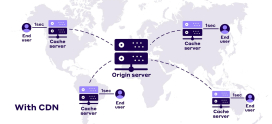
A content delivery network (CDN) solves this by caching your media on a distributed network of edge servers around the world. When a viewer in another region requests a file, it is served from a nearby edge node rather than traveling from your origin. The benefits are direct:
- Reduced origin load, because the CDN absorbs the bulk of repeated requests.
- Lower latency, because content is delivered from a server geographically closer to each viewer.
- Higher concurrency, because edge nodes collectively handle far more simultaneous viewers than one origin could.
- Resilience, because traffic spikes are distributed instead of hammering a single machine.
For on-demand media, the CDN caches and serves files. For live streaming, it distributes the segmented stream to thousands of viewers without each one connecting back to your origin. At any meaningful scale, the CDN is what separates a media server that works for a handful of users from one that serves an audience. See for a deeper look.
Why Do Media-Heavy Workloads Need Strong Hosting?
Pulling the threads together: a media convergence server is one of the most demanding things you can host. It is not the CPU-bound profile of a database, nor the lightweight profile of a brochure website. It is all of the above at once, and the failure modes are unforgiving. Run out of bandwidth and streams stutter for everyone. Run out of transcoding power and playback fails on the very devices that needed conversion most. Run out of storage and ingestion simply stops.
This is why media workloads belong on infrastructure built for them: real CPU cores, ample and ideally unmetered bandwidth, generous storage, root-level control, and a reliable network backbone, paired with a CDN for delivery. Anything less turns a converged media platform into a sequence of bottlenecks.
Hosting media at DarazHost. DarazHost VPS and dedicated server plans are built for exactly this kind of workload. You get the storage for large libraries, the bandwidth for sustained streaming, and the CPU power for transcoding, with full root access so you can install and tune Jellyfin, Plex, Emby, or your own streaming stack. Pair your server with our CDN to deliver media to a global audience without overloading the origin, backed by a reliable network and 24/7 support. Whether you are hosting a personal media library or a public streaming service, DarazHost gives you the balanced resources a media convergence server actually needs. Explore our and to get started.
Frequently Asked Questions
What is a media convergence server in simple terms? It is a single server that stores, processes, and delivers several types of media (text, images, audio, video, and live streams) from one place, instead of using separate systems for each format. Whether it is a home Jellyfin setup or a newsroom’s production infrastructure, the core idea is unified multi-format delivery.
Can I run a media convergence server on shared hosting? Generally no. Shared hosting restricts long-running processes, custom software, CPU usage, and bandwidth, all of which media servers depend on. A VPS or dedicated server with root access is the appropriate foundation because it gives you the control and the dedicated resources the workload requires.
What is the most important resource for a media server? There is no single answer, and that is the point. Storage, bandwidth, and CPU for transcoding all matter, and they are stressed together. The most common mistake is over-investing in disk space while under-provisioning bandwidth and transcoding CPU, which are just as likely to become the bottleneck.
Do I really need a CDN if I only have a few users? For a handful of users in one region, an origin server alone can be sufficient. A CDN becomes essential as your audience grows or spreads geographically, because it offloads delivery to edge servers worldwide, reducing origin load, cutting latency, and supporting far higher concurrency.
Which self-hosted media software is best for beginners? Jellyfin is a strong starting point because it is free, fully open source, and feature-complete, with no paywalled core functionality. Plex is a popular alternative known for its polished interface, though some features require a subscription.