LiveChat
  Support
Kernel-Based Virtual Machine (KVM): How KVM Virtualization Powers Modern VPS Hosting
If you have shopped for a VPS recently, you have almost certainly seen the letters “KVM” stamped across plan listings. It looks like a technical detail meant for system administrators, but it is actually one of the most important things to understand before you spend money on a virtual server. A kernel-based virtual machine is the technology that decides whether your “virtual private server” is a genuinely isolated machine with its own resources, or a partition quietly sharing a server with dozens of strangers.
This guide explains what KVM is, how it works under the hood, how it differs from older container-style virtualization, and why the distinction matters every single month when you pay your hosting bill.
Key Takeaways
• KVM stands for Kernel-based Virtual Machine — a virtualization technology built directly into the Linux kernel that turns Linux into a type-1 hypervisor.
• KVM uses hardware virtualization extensions (Intel VT-x and AMD-V) to run virtual machines at near-native speed.
• Each KVM virtual machine runs its own operating system and its own kernel on virtualized hardware, fully isolated from its neighbors.
• KVM differs sharply from container virtualization, where all instances share a single host kernel and a common resource pool.
• For VPS hosting, “KVM” is a promise about isolation and dedicated resources — it means a real virtual server, not an oversold partition.
What is a kernel-based virtual machine?
A kernel-based virtual machine (KVM) is virtualization technology built directly into the Linux kernel. Rather than running as a separate, heavyweight program that sits between the hardware and your operating system, KVM is a kernel module that turns the Linux kernel itself into a type-1 (bare-metal) hypervisor. Once that module is loaded, a single physical server can run multiple fully independent virtual machines, each behaving as if it were a standalone computer.
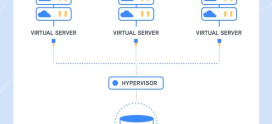
This is the core idea: one physical server, many isolated virtual machines. Each virtual machine — often called a guest — gets its own virtual CPU, its own virtual memory, its own virtual storage, its own virtual network interface, and crucially its own operating system with its own kernel. From inside the guest, it genuinely looks and feels like dedicated hardware. The guest does not know, and does not need to know, that it is sharing a physical box with others.
Because KVM lives inside the Linux kernel, it inherits everything the kernel already does well: a mature scheduler, memory management, device drivers, and security features. That tight integration is what makes KVM both lightweight and powerful compared to virtualization stacks bolted on from outside the operating system.
How does KVM virtualization actually work?
The reason KVM can run a full operating system inside a virtual machine without crippling performance comes down to hardware virtualization extensions. Modern processors from Intel ship with a feature called VT-x, and AMD ships an equivalent called AMD-V. These extensions let the CPU run guest code directly on the physical processor most of the time, only handing control back to the hypervisor for sensitive operations.
Here is the chain of events in simple terms:
- The host runs Linux, with the KVM kernel module loaded.
- KVM exposes the CPU’s virtualization extensions so guest operating systems can execute their instructions on the real processor.
- Each virtual machine receives a set of virtual hardware — CPU, RAM, disk, and network — that it treats as its own.
- A separate component called QEMU emulates the surrounding devices the guest expects to see, such as disk controllers and network cards.
- The guest boots its own operating system and kernel on this virtual hardware, completely unaware it is virtualized.
The result is near-native performance. Because most instructions run directly on the physical CPU rather than being emulated in software, a well-configured KVM virtual machine performs close to bare metal for most workloads. This combination — strong isolation plus real hardware acceleration — is exactly what makes KVM a serious foundation for production hosting rather than just a lab tool.
What is the difference between KVM and container virtualization?
The most important comparison for anyone buying a VPS is KVM versus container-based virtualization (the OpenVZ-style approach). They sound similar because both let one server host many “virtual servers,” but architecturally they are very different things.
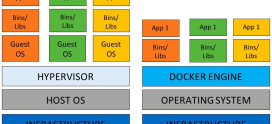
With KVM, each virtual machine is a full computer with its own kernel running on virtualized hardware. With container virtualization, there is no separate kernel per instance — every container shares the single kernel of the host machine and draws from a common pool of resources. Containers are lighter and start faster because they skip the overhead of a full virtual machine, but that lightness comes at the cost of isolation.
| Aspect | KVM (full hardware virtualization) | Container virtualization (OpenVZ-style) |
|---|---|---|
| Kernel | Each VM runs its own kernel | All instances share the host kernel |
| Isolation | Strong — VMs are genuinely walled off | Weaker — instances share host internals |
| Resources | CPU and RAM dedicated to each VM | Drawn from a shared, oversellable pool |
| Operating system | Run any OS (Linux, BSD, Windows, etc.) | Limited to the host kernel’s OS family |
| Custom kernels/modules | Supported — load your own modules | Not possible — only one kernel exists |
| Overhead | Slightly higher (full virtual machine) | Lower (no separate kernel per instance) |
| Overselling risk | Harder to oversell silently | Easier to oversell shared resources |
The trade-off is real: containers win on raw density and startup speed, but KVM wins decisively on isolation, flexibility, and predictable performance — the things that usually matter most when you are running something you care about.
Why does KVM matter for VPS hosting?
When a hosting plan advertises a KVM VPS, it is telling you something concrete about what you are buying. A KVM VPS is a true virtual server: it has its own kernel, guaranteed and dedicated slices of CPU and RAM, and full isolation from every other customer on the physical machine. You get genuine root access, and because the virtual machine runs its own kernel, you can install any operating system you like, load custom kernel modules, and tune the system as if it were your own dedicated box.
Contrast that with a container-based VPS. Here, all the “VPS” instances share the host’s single kernel and a common resource pool. That architecture makes it far easier for a provider to oversell — to promise more total CPU and memory than the server physically has, betting that not everyone uses their full allocation at once. It usually works, until a few neighbors spike at the same time and your performance suffers. And because there is only one kernel, you cannot run a different OS or load your own kernel modules even if you need to.
This is why the same three letters — VPS — can describe two very different products. The virtualization technology underneath determines whether “your” server is genuinely yours.
When you are shopping for a VPS, “KVM” is not just a technical acronym — it is a promise about isolation and resource guarantees that directly affects whether you get what you pay for. KVM is full hardware virtualization: each VPS runs its own kernel on virtualized hardware, genuinely walled off from its neighbors, with CPU and RAM actually allocated to it. Container-based virtualization — the cheaper, older alternative — instead has all the “VPS” instances share the host’s single kernel and a common pool of resources, which makes overselling easy and a noisy neighbor’s spike more likely to land on you. And you cannot run a custom kernel, because there is only one. So “KVM VPS” on a plan is shorthand for “a real virtual machine with its own kernel and dedicated resources, not a partition sharing the host” — which is exactly why a KVM VPS behaves more like a small dedicated server. The practical takeaway: if isolation, consistent performance, and the freedom to run any OS or kernel matter to you, KVM is the virtualization you want under your VPS. It is worth checking which type a host uses, because the same word “VPS” can mean very different things depending on whether it is KVM or container-based.
What are the benefits of a KVM VPS?
Choosing a KVM VPS over a container-based one gives you several tangible advantages:
- Real resource isolation. Your CPU and RAM allocation is genuinely yours, not borrowed from a shared pool that a busy neighbor can drain.
- Run any operating system or kernel. Because each VM has its own kernel, you are free to install nearly any OS — different Linux distributions, BSD variants, or others — and even compile a custom kernel.
- Stronger security separation. Full hardware-level isolation means a compromise or misbehavior in one virtual machine is far less likely to affect yours.
- Dedicated-server behavior. With its own kernel, guaranteed resources, and full root, a KVM VPS behaves much more like a small dedicated server than a shared partition.
- Custom kernel modules. Need a specific module, a tuned network stack, or a kernel feature your application depends on? KVM lets you load it; containers do not.
- More predictable performance. Dedicated resources mean fewer surprises — your workload runs consistently rather than fluctuating with the neighbors’ activity.
How does KVM fit into the virtualization stack?
It helps to see where KVM sits among the components that actually make a virtual machine run. A typical KVM-based VPS is built from three layers working together:
| Layer | Role |
|---|---|
| Linux kernel | The host operating system that runs everything and hosts the hypervisor. |
| KVM | The kernel module that turns Linux into a hypervisor and provides CPU/memory virtualization. |
| QEMU | The component that emulates devices (disk, network, display) so each guest sees complete virtual hardware. |
In practice, Linux + KVM + QEMU is the combination that powers most KVM virtual machines. KVM handles the heavy lifting of CPU and memory virtualization with hardware acceleration, while QEMU fills in the surrounding hardware the guest expects. Together they deliver a complete virtual machine that boots its own OS and runs at close to native speed. This open, Linux-native stack is one reason KVM has become a default foundation for cloud and VPS infrastructure across the industry.
DarazHost Linux SSD VPS — built on KVM
DarazHost Linux SSD VPS is built on KVM virtualization, so you get a true virtual machine with its own kernel, genuinely guaranteed and isolated CPU and RAM, full root access, and the freedom to run any OS you choose. That means performance and isolation closer to a dedicated server than to an oversold container VPS — backed by 99.9% uptime and 24/7 support. If you want a VPS where the resources you pay for are actually yours, KVM is the foundation that delivers it.
Frequently asked questions about KVM
What does KVM stand for? KVM stands for Kernel-based Virtual Machine. It is a virtualization technology built into the Linux kernel that turns Linux into a type-1 hypervisor, allowing one physical server to run multiple isolated virtual machines.
Is KVM better than container-based virtualization for a VPS? For most users who value isolation and predictable performance, yes. KVM gives each VPS its own kernel and dedicated resources, while container virtualization shares a single host kernel and a common resource pool. Containers are lighter, but KVM offers stronger isolation and the freedom to run any OS or custom kernel.
Does KVM require special hardware? KVM relies on hardware virtualization extensions — Intel VT-x or AMD-V — which are present in virtually all modern server processors. These extensions are what allow KVM virtual machines to run at near-native performance.
Can I run any operating system on a KVM VPS? In general, yes. Because each KVM virtual machine runs its own kernel on virtualized hardware, you can install nearly any operating system, including various Linux distributions and other OS families, and you can load custom kernel modules.
What is the difference between KVM and QEMU? KVM is the kernel module that provides CPU and memory virtualization with hardware acceleration. QEMU is the component that emulates the surrounding devices — disk, network, and display — so the guest sees complete virtual hardware. They are typically used together as Linux + KVM + QEMU.
For a broader understanding of how virtual servers work and how to choose the right one, see our complete guide: VPS Hosting Explained: The Complete Guide to Virtual Private Servers.