LiveChat
  Support
Hosting for Developers: The Complete Guide to a Real Environment You Control
Most hosting guides are written for people who want a website. This one is written for people who want to *run code*. If you build applications — a Laravel API, a Node service, a Python worker, a side project you want to deploy properly instead of leaving on your laptop — your needs are different from someone publishing a brochure site, and the hosting market mostly does not acknowledge that.
This is the hub page for hosting for developers. I will walk through what a development workflow actually demands from a server, how to choose between shared, VPS, and dedicated environments, how language runtimes and versions work, and how the whole chain fits together: SSH, version control, deployment, CI/CD, databases, staging, containers, and secrets. Each section is a deliberately compact overview. Where a topic deserves its own treatment, I link to a deeper guide so you can drill in without this page becoming a textbook.
Before any of that, here is the conclusion I want you to leave with, because it changes how you read everything below.
Key Takeaways
• The single most important hosting decision a developer makes is whether you control the environment — root and SSH access — not how much RAM you rent.
• Without root, you are limited to the runtimes, versions, and packages your host pre-installed; you *will* eventually hit a wall you cannot get past.
• Shared hosting suits simple sites and small PHP apps; a VPS with root removes the ceiling for anything non-trivial; dedicated is for scale and isolation.
• A real developer workflow chains together SSH, Git-based deployment, repeatable builds (CI/CD), a database you can reach and migrate, and a staging environment that mirrors production.
• Treat secrets and least privilege as part of the setup from day one, not an afterthought once something leaks.
What do developers actually need from hosting?
A non-developer needs a place to put files. A developer needs a place to run a process — and that distinction drives every requirement that follows.
You need shell access, almost always SSH, because the command line is where you install dependencies, run migrations, tail logs, and restart services. You need control over language runtimes: the specific version of PHP, Node, Python, or Ruby your project targets, not whatever the host decided to standardise on three years ago. You need the ability to install system packages — an image library, a headless browser, a message queue — and to run background processes like workers, schedulers, and queue consumers that keep going after your terminal closes.
Most of all you need control. The freedom to edit a config file, open a port, add a cron job, set an environment variable, or swap a database engine without filing a support ticket and waiting. Basic shared hosting is built to deny most of that control by design — it is the source of its stability and its low price. That trade is fine for a contact-form website and quietly fatal for an application that needs to grow.
Should you choose shared, VPS, or dedicated hosting for development?
There is no universally correct answer, but there is a clean way to reason about it.
Shared hosting puts your account alongside many others on one server, with the provider managing the OS and runtimes. It is cheap and zero-maintenance, and for a small WordPress site or a simple PHP app it is genuinely enough. The catch is that you get the environment the host gives you and very little say over it.
VPS hosting partitions a physical server into isolated virtual machines, each with guaranteed resources and — crucially — root access. This is the sweet spot for most serious development work: you install what you want, run background services, and tune the stack, without paying for an entire physical machine. For the full picture, see .
Dedicated hosting hands you the whole physical machine. You choose it when you need maximum and predictable performance, hardware-level isolation for compliance, or resource demands a VPS cannot satisfy. The deeper treatment lives in .
| Need | Shared | VPS | Dedicated |
|---|---|---|---|
| Root / SSH access | Limited or none | Full | Full |
| Install custom runtimes & packages | No | Yes | Yes |
| Background workers / daemons | Usually no | Yes | Yes |
| Guaranteed CPU / RAM | No | Yes | Yes (whole machine) |
| Typical fit | Simple sites, small PHP apps | Most app development | Scale, isolation, heavy load |
| Maintenance burden | Lowest | Moderate | Highest |
What language runtimes do you need, and how do versions work?
A runtime is the engine that executes your code, and the version of that engine matters more than newcomers expect. Code written for one major version of PHP, Node, or Python can break on another — function signatures change, features get deprecated, syntax evolves. Your job as a developer is to run the version your project targets, and ideally to run *different* versions for different projects on the same server.
That last part is where version managers earn their place. Tools like `nvm` for Node, `pyenv` for Python, and distribution packages or `update-alternatives` for PHP let you install several versions side by side and switch per project. None of that is possible without the ability to install software — which loops straight back to root access.
| Runtime | Typical version manager | Package/dependency tool | Common use |
|---|---|---|---|
| PHP | `update-alternatives`, distro repos | Composer | Laravel, WordPress, APIs |
| Node.js | `nvm`, `fnm` | npm, pnpm, Yarn | APIs, SSR apps, tooling |
| Python | `pyenv`, `venv` | pip, Poetry | Web apps, scripts, data work |
| Ruby | `rbenv`, RVM | Bundler | Rails, automation |
For PHP specifically — still the most common application runtime in shared and VPS hosting — the dedicated hub goes deep on versions, extensions, and configuration: . For step-by-step installs, see and .
How do SSH and the command line fit into a developer’s workflow?
SSH is the front door to your server, and for a developer it is less a tool than a daily habit. Through one encrypted connection you install dependencies, edit configuration, run database migrations, restart services, and read logs in real time. If you cannot reach a shell, you cannot really operate an application — you can only hope it keeps working.
The first upgrade everyone should make is to stop typing passwords and authenticate with SSH keys: a private key on your machine, a public key on the server, no password to phish or brute-force. From there the command line opens up — process management, file permissions, service control, scheduled jobs. These are not optional extras; they are the substrate every deployment runs on.
This whole domain has its own hub. Start with , and for the specifics see and .
How should developers handle version control and deployment?
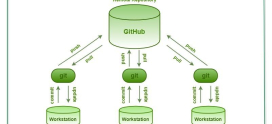
Version control is non-negotiable, and for nearly everyone that means Git. Beyond tracking history, Git is increasingly the *mechanism* of deployment itself. Instead of dragging files over FTP — slow, error-prone, and impossible to roll back cleanly — you push to a repository and the server updates itself.
The simplest form is a Git-based deploy: a bare repository on the server with a `post-receive` hook that checks out the latest code into your web root whenever you push. One `git push` and the site is live, atomically, with a clean way to revert. The next step up uses webhooks — your Git host (GitHub, GitLab, or a self-hosted instance) pings an endpoint on your server when you push, triggering a script that pulls, installs dependencies, and restarts services. No manual SSH session required.
The thing to internalise is that deployment should be repeatable and reversible. If deploying means remembering nine manual steps, you will eventually skip one at 2 a.m. Codify it. To get started, see and .
What does a real build and deployment workflow look like?
Git push triggers deployment — but what runs *between* the push and the live site is where reliability is won or lost. This is the domain of CI/CD: continuous integration and continuous deployment.
Continuous integration means that every push automatically runs your test suite and build steps in a clean environment. If a change breaks something, you find out in minutes, before it reaches users. Continuous deployment extends that pipeline so a passing build is promoted to staging or production automatically. The combined effect is that “it works on my machine” stops being an excuse, because every change is validated somewhere neutral.
You do not need a heavyweight platform to start. A modest pipeline — pull the code, install dependencies, run tests, build assets, restart the service — already removes most deployment risk. As complexity grows, configuration-management tools like Ansible let you describe a server’s desired state as code, so a new box can be provisioned identically and repeatably instead of being hand-assembled and quietly unique. For the practical path, see and .
How do you host frameworks and applications?
Frameworks shape how an app is structured, and each carries its own hosting expectations.
Laravel and the wider PHP ecosystem expect a recent PHP version, Composer for dependencies, a writable storage path, a queue worker for background jobs, and a scheduler entry in cron. None of that is exotic — but all of it assumes you can install Composer, run a long-lived worker process, and edit `php.ini`, which is precisely what shared hosting tends to forbid.
Node.js applications run as long-lived processes rather than per-request scripts, so they need a process manager (such as `pm2` or a `systemd` service) to stay alive and restart on crash, plus a reverse proxy in front to handle TLS and route traffic. APIs and microservices add their own concerns — rate limiting, structured logging, health checks — but rest on the same foundation: a process you control, kept running, reachable on a port you opened.
The recurring theme is that application hosting needs persistent processes and environment control. For specifics, see and .
What do developers need from a database?
Almost every application is only as healthy as its database, and developers need three things from one: reliable access, safe schema changes, and a sane backup story.
Reliable access often means connecting from your local machine to a remote database during development — which requires the server to allow that connection securely, usually over an SSH tunnel rather than a port exposed to the open internet. Safe schema changes mean migrations: versioned, repeatable scripts that evolve your schema alongside your code, so production and your laptop never drift apart. And backups mean knowing you can restore, ideally tested rather than assumed.
MySQL and MariaDB remain the default for most application stacks, with PostgreSQL close behind for teams that want its richer feature set. Whichever you choose, the operational concerns are the same, and they have their own hub: . For the connection details, see .
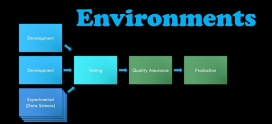
Why do you need separate development, staging, and production environments?
Pushing untested code straight to production is the single most common avoidable cause of downtime, and the fix is structural: separate development, staging, and production environments.
Development is your local machine, where you move fast and break things freely. Production is the live environment your users touch, where stability is everything. Staging is the bridge — a near-exact replica of production where you rehearse a deployment, run the test suite against production-like data, and catch the problems that only appear outside your laptop.
The word that matters here is parity. A staging environment that runs a different PHP version, a different database engine, or different environment variables than production will happily pass tests and then let the same code fail live. The closer staging mirrors production, the more failures it catches before users do — and that parity is far easier to guarantee when you control the environment on both ends. For the practical setup, see .
Should developers use containers like Docker?
Containers solve a problem every developer has felt: the gap between *my machine* and *the server*. Docker packages your application together with its runtime, libraries, and configuration into an image that runs the same way everywhere — your laptop, staging, production, a teammate’s machine.
The appeal for developers is consistency and reproducibility. A `Dockerfile` becomes a precise, version-controlled description of your environment, and `docker compose` lets you spin up your app alongside its database and cache with a single command. The cost is a layer of operational complexity — image builds, registries, orchestration — that a small project may not need. Containers are a powerful tool, not a mandatory one; reach for them when environment drift or multi-service coordination starts hurting. They also sit at the entry point to a much larger world of orchestration and managed infrastructure, covered in .
How should developers handle security and secrets?
Security is not a feature you add at the end; it is a set of habits you build in from the start, and for developers it concentrates around secrets and least privilege.
Secrets — database passwords, API keys, signing tokens — must never live in your code or your Git history. The standard practice is to keep them in environment variables or a dedicated secrets file that is excluded from version control, injected into the application at runtime. Least privilege means every component gets exactly the access it needs and nothing more: a database user scoped to one database, an application that runs as an unprivileged user rather than root, SSH keys instead of passwords, and a firewall that opens only the ports you actually use.
These habits are cheap to adopt early and expensive to retrofit after a leak. The full discipline — hardening, firewalls, access control, monitoring — has its own hub at .
The one decision that actually matters
Here is the unique insight I want to leave you with, because it cuts through most of the noise in hosting comparisons.
When developers shop for hosting, they fixate on specs — how many cores, how much RAM, how much disk. Those numbers matter, but they are not the dividing line. The line that actually matters is whether you have root and SSH access — whether you control the environment.
Without it, on typical shared hosting, you are confined to the runtimes, versions, and packages the host pre-installed. Everything works fine right up until the day it does not: you need a newer Node version the host has not added, a system library that is not available, a background worker the platform will not let you run, a config change the panel will not expose. At that point no amount of extra RAM helps, because the wall you have hit is one of *control*, not capacity.
A VPS or dedicated server with root removes that ceiling. You install the runtime you want, run the processes you need, and tune the stack to fit the application instead of bending the application to fit the host. So the real question when choosing developer hosting is not “how much RAM?” — it is “do I control this environment?” For any non-trivial development work, control beats raw specs, every time.
Build on an environment you actually control with DarazHost
If you have read this far, you already know what to look for. DarazHost Linux SSD VPS and dedicated servers are built for exactly the workflow this guide describes: full root and SSH access, your choice of Linux distribution, and the freedom to install any runtime you need — current PHP, Node.js, Python — alongside your database and tooling of choice.
That means Git-based deployment workflows, guaranteed and isolated resources so performance stays predictable, and transparent pricing with no surprises as you scale. It is a real environment you control — for building, deploying, and running applications — backed by 24/7 support when you need a hand. Whether you are deploying a Laravel API, running a Node service with background workers, or standing up a staging environment that mirrors production, you get the control that serious development demands instead of the ceiling that shared hosting imposes.
Frequently asked questions
Do I need a VPS, or is shared hosting enough for development? If you are running a simple site or a small PHP app and do not need to install custom software or run background processes, shared hosting can be enough. The moment you need a specific runtime version, a system package, a queue worker, or root access, you have outgrown shared hosting and want a VPS.
Can I install any version of Node, PHP, or Python I want? On a VPS or dedicated server with root, yes — using version managers like `nvm`, `pyenv`, or distribution tooling, you can install and switch between multiple versions per project. On most shared hosting you are limited to the versions the provider offers.
What is Git-based deployment? It is a workflow where pushing to a Git repository triggers your server to update itself — typically via a `post-receive` hook or a webhook that pulls the latest code, installs dependencies, and restarts services. It replaces error-prone FTP uploads with atomic, reversible deploys.
Why do I need a staging environment? Staging is a near-exact copy of production where you rehearse deployments and run tests against production-like conditions. It catches the failures that only appear outside your local machine, which is why production-staging parity is worth the effort.
How should I store secrets like API keys and database passwords? Keep them out of your code and Git history entirely. Store them in environment variables or a secrets file excluded from version control, and inject them at runtime. Combine that with least-privilege access so each component holds only the credentials it needs.
Do I need Docker to be a productive developer? No. Docker is valuable when you are fighting environment drift or coordinating multiple services, but plenty of applications deploy perfectly well without it. Treat containers as a tool to reach for when they solve a real problem, not a default requirement.
Where to go next
This pillar is the map; the linked guides are the territory. If you are deciding on an environment, start with the and hubs. If you are setting up your stack, work through , , and . And before you go live, lock things down with .
For further reading beyond this site, the official documentation is the authority worth bookmarking: the Git documentation, the Docker documentation, the Node.js docs, the Python documentation, and the OpenSSH manual. When the version managers and config files start to blur together, those primary sources will keep you honest.