LiveChat
  Support
Domain Expiry Checker: How to Check When a Domain Expires (and Never Lose Yours)
A domain name is not a permanent possession. You do not *own* it the way you own a chair; you lease it, in fixed terms, from a registry through a registrar. That lease has an end date. A domain expiry checker is simply the tool that tells you when that end date is, for any domain on the internet, including your own.
Most people only learn this the hard way, on the morning their website and email both go dark. The good news is that the entire system is predictable. Once you understand how to check an expiration date and what happens after it passes, you can manage your domains with confidence and even time your move on a domain someone else is about to let go.
Key Takeaways
• A domain expiry checker reads public registration records (WHOIS / RDAP) to show a domain’s expiration date in seconds.
• You can check any domain this way, plus your own registrar dashboard shows yours with renewal controls.
• An expired domain does not disappear instantly — it moves through timed stages: grace period → redemption → pending delete → released.
• Catching a lapse early (in the grace period) means a cheap, normal-priced renewal; waiting means premium fees or losing the domain entirely.
• The single best protection is auto-renew plus current billing details so you never enter that gauntlet at all.
What is a domain expiry checker and how does it work?
A domain expiry checker is a lookup tool that queries the public records every registered domain leaves behind. When a domain is registered, the registry stores key dates — creation date, last update, and crucially the expiration date — and exposes them through standard protocols. An expiry checker reads those records and shows you the relevant date in plain language.
There are three underlying data sources you will hear about:
- WHOIS — the original, long-standing directory of domain registration data.
- ICANN Lookup — ICANN’s official web-based WHOIS/RDAP front end, useful as a neutral, authoritative source.
- RDAP (Registration Data Access Protocol) — the modern, structured successor to WHOIS that returns clean, machine-readable data and is steadily replacing it.
Whichever the tool uses underneath, the output you care about is the same field: the registry expiry date.
How do I check when a domain expires?
You can check any domain’s expiration date in under a minute. Here is the methodical way to do it.
- Pick a lookup source. Use ICANN Lookup for an authoritative reading, or any reputable domain expiry checker / WHOIS tool. For your own domains, your registrar dashboard is fastest.
- Enter the full domain. Type the bare domain — `example.com` — without `https://`, `www`, or any path. The lookup works on the registered name only.
- Run the lookup. Submit the query. The tool contacts the registry (or the registrar’s WHOIS/RDAP server) and returns the registration record.
- Find the expiration field. Look for `Registry Expiry Date`, `Expiration Date`, or `Expires On`. This is the date the current registration term ends. RDAP also labels this clearly as the “expiration” event.
- Note the status codes too. Fields like `Domain Status` reveal whether a domain is locked, on hold, or already in a redemption/pending-delete stage — important if you are eyeing a domain that has already lapsed.
- For your own domain, open your registrar dashboard. Your account shows the exact expiry date alongside renewal and auto-renew controls, which is what you actually act on.
That last point matters: a public checker tells you *when*, but only your registrar account lets you *do something about it*.
Why should I check a domain’s expiry date?
There are three distinct reasons to run a check, and they serve different goals.
To protect a domain you own. Knowing your own expiry date lets you confirm auto-renew is working and plan renewals before they become emergencies. A domain you assume is “set and forget” can quietly lapse if a card expired.
To plan renewals and budget. If you manage several domains, a periodic check keeps every expiration date visible so renewals never collide or surprise you.
To evaluate a domain you want to acquire. If a domain you would love to own is currently registered to someone else, its expiry date tells you the earliest point it *might* become available — useful if you are watching for it to drop.
What is the domain expiry lifecycle?
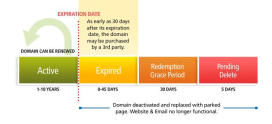
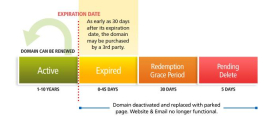
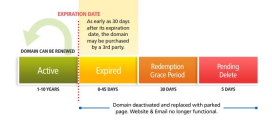
This is the part most people misunderstand, and it is the heart of using an expiry checker well. A domain does not switch from “yours” to “anyone’s” at midnight on the expiry date. It falls through a series of timed stages, each with different rules and costs. Knowing where a domain sits in this sequence is the difference between a cheap fix and an expensive loss.
The single most valuable thing to understand about domain expiry is this: a domain does not vanish the instant it “expires.” It descends through a predictable gauntlet of timed stages, and where it is in that gauntlet decides everything about recovery cost and ownership. Right after the expiry date there is usually a grace period where you renew at the *normal* price and, practically, nothing bad has happened yet. Miss that and you reach the redemption period, where you can still get the domain back but at a steep premium and with extra paperwork. Miss *that* and it enters pending delete, then drops to the open market where anyone — competitors and domain investors who actively watch expiry checkers — can register it. So the practical lesson is twofold. For your domains: turn on auto-renew and keep billing current so you never enter the gauntlet at all. If you ever do lapse, act *in the grace period*, when recovery is cheap and routine — not weeks later when it costs a premium or is simply gone. For a domain you want: an expiry checker tells you which stage it is in and roughly when it might finally become available to register.
Here is the lifecycle laid out. (Exact durations vary by registry and registrar; the figures below reflect common patterns for typical generic TLDs like `.com`.)
| Stage | Typical duration | What it means | Can you still get the domain? | Cost to recover |
|---|---|---|---|---|
| Active / Registered | Up to expiry date | Normal operation; site and email work | N/A — it’s yours | Standard renewal |
| Expired (grace period) | Often ~30–45 days | Term has ended; services may stop, but you can still renew normally | Yes — easily | Normal renewal price |
| Redemption period | ~30 days | Domain is held for the owner but flagged for deletion | Yes — but with a restore process | Premium / redemption fee |
| Pending delete | ~5 days | Final hold before release; no recovery possible | No | N/A |
| Released / Available | Open-ended | Domain returns to the open market | Anyone can register it | New registration price |
What actually happens when a domain expires?
The moment the expiration date passes, the practical effects begin even though the recovery window is still open.
First, services go down. Your website typically stops resolving and your email stops working, because the domain is no longer being served normally. Many registrars also park the domain on a placeholder page. This alone is why expiry is an emergency for a live business.
Then the lifecycle runs its course. The domain moves into the grace period, then redemption, then pending delete, as described above. Throughout the early stages the original registrant retains the right to recover it — that right just gets more expensive and more procedural as time passes.
Finally, it is released. Once pending delete ends, the domain drops back to the registry pool and becomes available for *anyone* to register on a first-come basis. At this point it is no longer “your” domain in any sense — it is simply an available name.
How do I make sure I never lose a domain?
Losing a domain is almost always preventable. The entire risk comes from entering the expiry gauntlet by accident. Here is how to make sure you never do.
- Turn on auto-renew. This is the single most effective control. With auto-renew enabled, your domain renews automatically before it can lapse.
- Keep your payment method current. Auto-renew fails silently if the card on file has expired. Update billing details proactively, not after a decline.
- Keep your contact details accurate. Renewal reminders and important notices go to your registration email. An outdated address means you never see the warning.
- Enable renewal reminders. Most registrars send advance notices; make sure they reach an inbox you actually check.
- Register for longer terms. Registering a domain for several years at once shrinks the number of renewal moments where something can go wrong.
- Lock the domain. A registrar lock (and registry lock) prevents unauthorized transfers and accidental changes, protecting the domain’s integrity year-round.
How do I check a domain I want to buy?
If you have your eye on a name that is already taken, an expiry checker becomes a planning tool. Run the lookup and read two things: the expiration date and the domain status.
The expiration date tells you the earliest the current owner *could* let it go. The status codes tell you whether it has already started down the lifecycle — `redemptionPeriod` or `pendingDelete` statuses mean the clock is already running toward release. By combining these, you can estimate a rough window for when the domain might drop and become registrable.
Be realistic, though: many owners renew right up to the last moment, and valuable expiring names are actively contested. The expiry date is a signal, not a guarantee.
What is the real danger of letting a domain lapse?
The cost of a lapsed domain is far larger than the renewal fee you missed. Three things are at stake.
Your brand. Your domain *is* your identity online. If it drops and someone else registers it, you can lose the address customers know, type, and trust — potentially permanently.
Your SEO. Years of accumulated search authority, backlinks, and rankings are tied to that domain. Losing it, or even taking it offline for weeks, can erase progress that took a long time to build.
Your security and reputation. A dropped domain can be picked up by anyone, including parties who may use a familiar-looking address in ways that damage the reputation you built. That is why competitors and investors monitor expiry data closely.
In short: the renewal fee is trivial compared to what a lapse can cost. The expiry checker exists so you never have to find that out firsthand.
To understand where domain expiry fits into the bigger picture of registering, choosing, and truly owning your web address, see our pillar guide: Domain names: the complete guide to how they work, choosing one, and owning your address.
Protect your domains with DarazHost. DarazHost helps you never lose a domain. Your dashboard shows clear expiry dates, sends renewal reminders, offers auto-renew options, and includes domain locking — all in one place, right alongside your hosting and email. With 24/7 support, you can manage and protect every domain’s expiry from a single account, so your brand never slips into redemption or drops to someone else. Keep your address yours, year after year.
Frequently asked questions
What is the best domain expiry checker? The most authoritative free option is ICANN Lookup, which reads official WHOIS/RDAP records. For your own domains, your registrar dashboard is the best source because it shows the expiry date *and* lets you renew or enable auto-renew in the same place.
How do I check when my own domain expires? Log in to your registrar account and open the domain’s management page — the expiration date is shown there alongside renewal controls. You can also run a public WHOIS or ICANN Lookup on the domain to confirm the registry expiry date.
Can I get my domain back after it expires? Often, yes — if you act quickly. During the grace period you can usually renew at the normal price. After that, in the redemption period, you can still restore it but at a premium fee. Once it reaches pending delete, recovery is no longer possible.
How long after expiry before a domain becomes available to register? It varies by registry, but commonly a domain passes through a grace period (~30–45 days), a redemption period (~30 days), and pending delete (~5 days) before it is released. That can total roughly two months or more, though exact timings differ.
Does my website go down the moment my domain expires? Typically yes. Once the expiration date passes, the domain usually stops resolving normally, which takes your website and email offline even though a recovery window still exists. This is why renewing on time matters so much.