LiveChat
  Support
Cloud Hosting and Containers: The Strategic Guide to Scalable Infrastructure
Few words in technology carry as much weight, or as much marketing fog, as “cloud” and “containers.” They are presented as the destination every serious business eventually reaches, the modern way to run anything online. That framing sells infrastructure, but it does not help you make a good decision. The real question is never *should I move to the cloud?* It is *does the way my workload behaves actually justify the complexity and cost that cloud and containers bring?*
This is the hub page for that conversation. I will walk through what cloud hosting really is, how containers like Docker and orchestrators like Kubernetes fit in, and where each technology genuinely pays off. Each section is a broad overview, with links out to deeper guides where a subject deserves its own treatment. My goal is not to talk you into the cloud or out of it, but to help you match the tool to the workload, which is the only decision that consistently saves money and prevents regret.
Key Takeaways
• Cloud hosting draws compute, storage, and networking from a distributed pool of many physical machines rather than one fixed box, which is what makes on-demand scaling possible.
• Containers (Docker) package an application together with its dependencies so it runs identically everywhere, solving the “works on my machine” problem and standardizing deployment.
• Orchestration (Kubernetes) automates running containers at scale across many servers; powerful, but it adds significant operational complexity most teams do not need yet.
• Cloud and containers excel at variable, large-scale, or rapidly changing workloads. They trade predictable cost and simplicity for elasticity and portability.
• For the majority of websites and small-to-mid applications, a well-provisioned VPS or dedicated server is simpler, cheaper, and just as fast. Adopt cloud and containers when your scaling or deployment patterns demand them, not because of the buzzword.
What is cloud hosting and how does it differ from traditional hosting?
Cloud hosting is a model in which your website or application runs on resources pulled from a large, shared pool of physical servers rather than from a single dedicated machine. In traditional hosting, whether shared, VPS, or dedicated, your site lives on one specific box with a fixed allocation of CPU, memory, and storage. If that box fills up or fails, you have a problem tied to that hardware. Cloud hosting abstracts the hardware away. Your workload is distributed across a cluster, and the platform pulls capacity from wherever it is available, treating compute as a fluid resource rather than a fixed address.
That single architectural difference, resources from a pool instead of one box, is the source of nearly everything people praise about the cloud. It is why you can add capacity in minutes, why a hardware failure can be routed around automatically, and why you pay for what you consume. It is also the source of the trade-offs: less predictable billing, more moving parts, and a steeper learning curve.
| Dimension | Traditional hosting (shared, VPS, dedicated) | Cloud hosting |
|---|---|---|
| Resource source | One physical machine, fixed allocation | Pool of many machines, drawn on demand |
| Scaling | Manual upgrade, often with downtime | On-demand, add or remove capacity quickly |
| Failure handling | Tied to the one machine | Workload can shift to healthy hardware |
| Billing model | Fixed monthly price | Often pay-as-you-go, usage-based |
| Cost predictability | High, you know the bill in advance | Lower, bills move with usage |
| Operational complexity | Lower, fewer moving parts | Higher, more services to manage |
How does cloud hosting actually work?
Underneath the marketing, cloud hosting rests on three well-understood ideas working together. The first is virtualization: the same hypervisor technology that lets a single physical server be split into many isolated virtual machines is what lets a cloud platform carve its fleet into the flexible units it hands out to customers. Virtualization decouples your server from any one piece of hardware, which is the precondition for everything else.
The second idea is distributed resources. A cloud platform is not one server but a coordinated cluster of many, often spread across multiple data centers. A control layer tracks where capacity is available and places your workload accordingly. Because your virtual machines are not welded to specific hardware, the platform can move them, replicate them, or spin up more of them across the cluster without you caring which physical box does the work.
The third idea is automated scaling. Because capacity is virtual and pooled, software can request more of it programmatically. When traffic rises, the platform launches additional instances; when it falls, it retires them. This is the elasticity that defines cloud computing, and it depends entirely on the first two ideas. Strip the marketing away and cloud hosting is simply virtualization plus a distributed pool plus automation that grows and shrinks your footprint on demand.
What are the benefits and trade-offs of cloud hosting?
The honest way to evaluate cloud hosting is to look at its strengths and its costs side by side, because every benefit it offers comes paired with a corresponding trade-off. The cloud is not strictly better than traditional hosting; it is different, and it is better only for workloads that value what it provides.
Its headline strength is scalability and elasticity. You can grow to meet a traffic surge and shrink afterward, paying only for what you used. For a business with sharp, unpredictable peaks, that flexibility is genuinely valuable and hard to replicate on fixed hardware. The second strength is resilience, since a workload spread across a cluster can survive the loss of any single machine. The third is pay-as-you-go pricing, which can be efficient when usage is genuinely variable.
The trade-offs are just as real. Cost predictability suffers, because usage-based billing means your invoice moves with your traffic, and metered services accumulate charges in ways that are hard to forecast, the so-called surprise cloud bill. Complexity rises, because elasticity, distributed storage, networking, and identity all become things you configure and monitor. And for steady workloads, the cloud is frequently more expensive than a fixed server rented for a flat fee.
| Benefit | The trade-off that comes with it |
|---|---|
| Scale up and down on demand | Variable, harder-to-predict billing |
| Pay only for what you use | Can cost more than a flat-rate server for steady loads |
| Survives single-machine failure | More architecture to design and maintain |
| Rapid provisioning of new capacity | More services, dashboards, and concepts to learn |
| Geographic distribution | Networking and data-transfer costs add up |
Where does cloud fit against VPS and dedicated hosting?
It helps to place cloud hosting on the same spectrum as the other models rather than treating it as a separate universe. A VPS gives you a guaranteed, isolated slice of one physical server with full root access, at a predictable flat price. A dedicated server gives you an entire physical machine, the most raw power and the strongest isolation, again at a fixed cost. Cloud layers horizontal scalability across a cluster of machines on top of virtualization, trading the predictability of those models for elasticity.
The practical decision rule is about the shape of your workload. If your needs are reasonably stable, a VPS or dedicated server is usually simpler and cheaper, and you keep a bill you can predict. If your needs swing dramatically, or you genuinely need to scale across many machines, cloud earns its complexity. Many mature businesses end up with a blend, running a stable core on fixed servers and bursting variable workloads into the cloud, because the two models solve different problems.
How do scalability and elasticity actually work?
Scaling comes in two flavors, and the difference matters when you plan infrastructure. Scaling up (vertical scaling) means making a single server bigger, adding more CPU or memory to the same machine. It is simple and requires no application changes, but there is a ceiling: a machine can only get so large. Scaling out (horizontal scaling) means adding more machines and spreading the load across them. It has effectively no ceiling, but it requires that your application be designed to run across multiple instances, and it requires something to distribute requests among them.
That something is a load balancer, which sits in front of your servers and routes incoming traffic across the available instances, keeping any one from being overwhelmed and removing failed instances from rotation. Horizontal scaling and load balancing are inseparable. Elasticity is the automated version of this: the platform watches demand and adds or removes instances behind the load balancer automatically, so capacity tracks traffic in near real time. This is the mechanism that makes the cloud’s headline promise real, and it is why cloud architecture asks more of your application than a single server does.
What are containers and what does Docker do?
A container is a lightweight, self-contained package that bundles an application together with everything it needs to run: the code, the runtime, the system libraries, and the configuration. The dominant tool for building and running containers is Docker. The problem containers solve is deceptively mundane but enormously costly in practice: software that runs perfectly in one environment fails in another because some dependency, version, or setting differs. The classic symptom is “it works on my machine.” A container eliminates that class of failure by shipping the environment along with the application, so the same container runs identically on a developer’s laptop, a test server, and production.
This is why containers have become the standard unit of modern deployment. They make environments reproducible and applications portable across hosts and providers, and they let teams move a tested artifact from development to production without rebuilding it. Importantly, you do not need the cloud to use Docker. Containers run beautifully on a single VPS or dedicated server, and for many teams that is exactly where they should run. Docker is fundamentally a packaging and consistency technology, not a scaling technology, and conflating the two leads to a lot of unnecessary infrastructure.
What is container orchestration and when do you need Kubernetes?
Running one or a handful of containers on a single server is straightforward. Running hundreds of containers across many servers, keeping them healthy, restarting them when they crash, scaling them with demand, and updating them without downtime, is a different problem entirely. That is the problem container orchestration solves, and Kubernetes is the dominant orchestrator. Kubernetes schedules containers onto a cluster of machines, monitors their health, replaces failures automatically, scales them based on load, and coordinates rolling updates, all according to a declarative description of the state you want.
Kubernetes is genuinely powerful, and at large scale it is close to indispensable. It is also one of the most complex pieces of infrastructure in common use, and that complexity is the entire reason to be cautious. The honest signal that you need Kubernetes is structural: you are running many services, across many machines, with real demands for automated scaling, self-healing, and zero-downtime deployment, and a team able to operate it. If you are running a handful of containers on one or two servers, Kubernetes will add far more operational burden than it removes, and a simpler tool such as Docker Compose will serve you better. Adopt orchestration when the scale of what you are running, not the appeal of the technology, forces the issue.
How do containers differ from virtual machines?
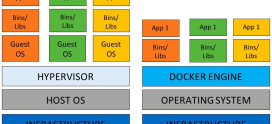
Containers and virtual machines both isolate applications, but they do it at different levels, and the distinction drives when each is appropriate. A virtual machine virtualizes the hardware: each VM runs a complete operating system, including its own kernel, on top of a hypervisor. That gives strong isolation and lets you run entirely different operating systems side by side, at the cost of size and startup time, since every VM carries a full OS. A container virtualizes the operating system instead: containers share the host’s kernel and isolate only the application and its dependencies. That makes them far smaller and faster to start, but it means containers on a host share that host’s kernel and offer somewhat lighter isolation.
| Dimension | Virtual machines | Containers |
|---|---|---|
| Isolation level | Full hardware, separate OS and kernel | OS-level, shared host kernel |
| Size | Large (gigabytes, full OS) | Small (megabytes, app and deps) |
| Startup time | Slower (boots an OS) | Near-instant |
| Isolation strength | Stronger | Lighter, kernel shared |
| Best for | Strong isolation, mixed OSes, legacy apps | Portable apps, microservices, fast deploys |
In practice the two are complementary rather than competing. It is extremely common to run containers on top of virtual machines, getting the strong isolation of the VM as a boundary and the portability and density of containers within it. Choose VMs when isolation or running different operating systems is the priority, and containers when consistency, portability, and deployment speed matter most.
What are the main use cases for cloud and containers?
A few patterns explain most legitimate adoption of cloud and containers. The first is microservices, where a large application is broken into many small, independently deployable services. Containers are a natural fit because each service ships as its own isolated, portable unit, and orchestration coordinates them at scale. The second is continuous integration and deployment (CI/CD), where automated pipelines build, test, and ship code frequently. Containers make pipelines reliable by guaranteeing that the artifact tested is the artifact deployed, with no environmental drift in between.
The third pattern is development and production parity. Because a container runs identically everywhere, a developer’s environment can mirror production closely, removing an entire category of late-stage surprises. The fourth is bursty or unpredictable scale, the canonical cloud use case, where traffic spikes sharply and elasticity lets capacity follow demand without paying for peak capacity year-round. Notice that the first three are really about consistency and deployment discipline, which containers deliver even on a single server, while only the last truly requires cloud-style elasticity. Separating those motivations keeps you from buying scale you do not need to get consistency you could have had cheaply.
How do you manage cloud and container infrastructure responsibly?
Adopting cloud and containers shifts where your operational effort goes; it does not remove it. Three areas demand ongoing attention. The first is cost, the most common source of regret. Usage-based billing rewards careful design and punishes carelessness, so right-sizing instances, shutting down idle resources, and watching data-transfer charges are not optional housekeeping but core discipline. The surprise cloud bill is almost always a management failure rather than a pricing trick.
The second is security. Containers and clusters introduce their own concerns: image vulnerabilities, secrets management, network policies between services, and access control across the platform. A container is only as trustworthy as the image it was built from, and a cluster is only as secure as its least careful configuration. The third is monitoring and observability. A distributed system is far harder to reason about than a single server, so you need centralized logging, metrics, and alerting to understand what is happening. Without observability, distributed infrastructure becomes a set of failures you discover from your users rather than your dashboards. The throughline is that the cloud trades the simplicity of one server for capability, and that trade is only worth it if you invest in managing the complexity it introduces.
DarazHost: the predictable foundation for modern stacks
Here is where I will be direct about how DarazHost fits this picture, because it fits the honest version of it rather than the buzzword version. Most real-world workloads do not need a sprawling cloud platform; they need a solid, controllable server with guaranteed resources and a bill they can predict. DarazHost gives you exactly that foundation. You can deploy Docker containers and scalable applications on Linux SSD VPS or dedicated servers with full root access, guaranteed resources rather than a shared pool you compete for, and transparent pricing with no surprise cloud bills at the end of the month.
That is the balance most teams are actually looking for: the control and performance to run a modern stack, including containers, without taking on cloud-scale complexity and unpredictable cost before your workload demands it. And when your architecture grows to the point where it genuinely needs more, DarazHost’s 24/7 support is there to help you design the next step rather than sell you a tier you do not need. The right tool for the workload, with the option to scale when the workload, not the marketing, says it is time.
When do cloud and containers genuinely make sense?
UNIQUE INSIGHT: The most useful thing I can tell you about cloud and containers is that they are not a maturity level you graduate to; they are tools that solve a narrow problem set, namely variable, large-scale, or rapidly changing workloads, and they charge you in complexity and often in money for the privilege. The industry talks about them as though every serious operation needs them, but that framing is backwards. For the large majority of websites and small-to-mid applications, a well-provisioned VPS or dedicated server is simpler, cheaper, and every bit as fast, because those sites do not have the wild scaling or relentless deployment cadence that cloud and orchestration exist to handle.
So the honest decision criteria are concrete. Reach for cloud elasticity when your traffic is genuinely spiky, when you must scale across many machines, or when surviving the failure of any single host is a hard requirement. Reach for containers when consistency across environments and deployment discipline matter, which is often, and remember you can get those benefits on a single server. Reach for orchestration only when you are running many services across many machines at a scale a human cannot manage by hand. When none of those conditions hold, choose the simpler, cheaper, predictable path without apology, because matching the tool to the workload is what good infrastructure decisions look like. The buzzword is never the reason; the workload always is.
Frequently asked questions
Is cloud hosting always cheaper than a VPS or dedicated server? No, and often it is the opposite. Cloud’s pay-as-you-go model is efficient for genuinely variable usage, but for steady, predictable workloads a flat-rate VPS or dedicated server is frequently cheaper and far easier to budget for. Usage-based billing can accumulate into surprise costs when resources are left running or data transfer is high.
Do I need the cloud to use Docker containers? No. Docker is a packaging and consistency technology, not a scaling one. Containers run perfectly well on a single VPS or dedicated server, and for many teams that is the ideal place for them. You gain reproducibility and portability without taking on any cloud complexity.
What is the difference between Docker and Kubernetes? Docker builds and runs individual containers. Kubernetes orchestrates many containers across many machines, handling scheduling, scaling, health checks, and updates automatically. Docker is the unit; Kubernetes is the system that manages large numbers of those units at scale. You can use Docker without ever touching Kubernetes.
When do I actually need Kubernetes? When you are running many services across many servers with real requirements for automated scaling, self-healing, and zero-downtime deployment, and you have a team able to operate it. For a handful of containers on one or two servers, Kubernetes adds far more operational burden than it removes, and a simpler tool like Docker Compose is the better choice.
Are containers the same as virtual machines? No. A virtual machine runs a full operating system on virtualized hardware and offers strong isolation. A container shares the host’s kernel and isolates only the application and its dependencies, making it much smaller and faster to start with somewhat lighter isolation. They are often used together, with containers running on top of VMs.
How do I avoid a surprise cloud bill? Treat cost as an ongoing discipline. Right-size instances, shut down idle resources, watch data-transfer charges, and set up billing alerts. Surprise bills almost always come from forgotten running resources or unmonitored usage rather than the pricing itself. If predictable cost matters more than elasticity, a flat-rate server avoids the problem entirely.
Where to go from here
Cloud hosting and containers are powerful tools, and like all powerful tools they reward being used for the job they were built for. If your next step is understanding the foundations they sit on, start with the building blocks below and drill into the deeper guides as your needs take shape.
– – – – – –
For background on the underlying technologies referenced throughout this guide, the official documentation for Docker and Kubernetes are the authoritative starting points, and the Cloud Native Computing Foundation maintains a broader map of the container ecosystem.