LiveChat
  Support
WordPress Security Maintenance: The Security Side of a Care Plan
A WordPress care plan covers several disciplines — updates, backups, performance, and support — but security maintenance is the part that most directly protects your business from disaster. It is the ongoing, disciplined work of keeping attackers out: hardening the site, patching known vulnerabilities, scanning for malware, filtering hostile traffic, and being ready to respond when something goes wrong. This guide focuses specifically on that security component — what it involves, how often each task runs, and how to decide between handling it yourself and delegating it to a managed plan.
If you want the broader picture of everything a care plan covers, start with the and the . This post zooms in on security alone.
Key Takeaways
• Security maintenance is the protective core of a WordPress care plan: hardening, timely security updates, malware scanning, a web application firewall, login protection, file-integrity monitoring, and incident response.
• WordPress is targeted heavily because of its popularity and its vast ecosystem of third-party plugins and themes, where most vulnerabilities actually live.
• The single highest-value security task is consistent, timely patching — out-of-date plugins and themes are the most common entry point for compromises.
• Security works in layers: site-level plugins and practices on top of hosting-level security like server firewalls and isolation.
• DIY security is possible but demands constant attention; a managed plan plus secure hosting trades a fee for vigilance and accountability.
Why is WordPress such a frequent target for attacks?
WordPress powers a large share of the web, and that popularity is exactly what makes it attractive to attackers. When a single platform runs so many sites, any newly discovered weakness becomes a high-value, reusable exploit. Automated bots scan the internet continuously, fingerprinting WordPress installations and probing them for known flaws — they do not choose victims by importance, only by exposure.
The bigger factor, though, is the ecosystem. Core WordPress is maintained by a security-conscious team and is comparatively hard to breach directly. The real attack surface is the third-party code you add on top: plugins and themes written by thousands of independent developers of varying skill and diligence. A single vulnerable plugin can hand an attacker a way in, regardless of how solid the core is.
This is why security maintenance is never “done.” Every plugin you install, every theme you activate, and every user account you create expands the surface that has to be defended — continuously.
What does WordPress security maintenance actually involve?
Security maintenance is a set of recurring tasks, each closing a different category of risk. A complete program covers all of them rather than relying on any single tool.
Timely security updates for core, plugins, and themes
The foundation of WordPress security is patching. When a vulnerability is disclosed in a plugin, theme, or core, a fix is usually released quickly — but a fix only protects sites that actually apply it. Security maintenance means applying security updates promptly, ideally after a backup and with a quick post-update check to confirm nothing broke. Prioritize updates flagged as security releases over routine feature updates.
Malware scanning and file-integrity monitoring
Regular malware scanning inspects your files and database for known malicious signatures, injected scripts, and backdoors. File-integrity monitoring complements it by detecting *unexpected changes* — if a core file is modified or a new PHP file appears where none should be, that is an early signal of compromise, often before any visible damage.
A web application firewall
A web application firewall (WAF) sits in front of your site and filters incoming requests, blocking common attack patterns — SQL injection, cross-site scripting, malicious bots, and probes against known vulnerabilities — before they ever reach WordPress. A WAF buys critical protection time, shielding even an unpatched flaw until you can update.
Login hardening: 2FA, limiting attempts, and strong credentials
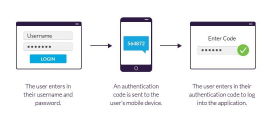
The login page is the most attacked endpoint on most WordPress sites. Hardening it is high-impact and low-effort: enable two-factor authentication (2FA), limit login attempts to stop brute-force guessing, enforce strong passwords, and avoid predictable usernames like “admin.” Applying the principle of least privilege to user roles — giving each account only the access it genuinely needs — limits the damage any single compromised account can do.
SSL, security headers, and configuration hardening
SSL/TLS encrypts traffic between visitors and your site and is now a baseline expectation. Beyond that, security headers (such as a Content Security Policy and HTTP Strict Transport Security) instruct browsers to behave more defensively. Configuration hardening — disabling file editing in the dashboard, protecting key files, and removing version disclosure — closes off easy reconnaissance.
Backups as your recovery layer
No defense is perfect, so backups are the safety net that makes recovery possible. Regular, off-site, tested backups mean that even a successful attack becomes a restore-and-clean operation rather than a permanent loss. Treat backups as part of security, not just maintenance — an untested backup is only a hope.
Reducing attack surface
Every component you do not use is risk you do not need. Removing unused plugins and themes — fully deleting them, not just deactivating them, since inactive code can still be exploited — shrinks the attack surface. Fewer moving parts mean fewer potential vulnerabilities to track and patch.
Here is the most important thing to understand about WordPress security: the large majority of compromised sites are not breached by exotic, novel attacks. They are breached through out-of-date plugins and themes with publicly known vulnerabilities — flaws for which a patch already existed but was never applied. The exploit is public, the fix is public, and the only thing missing was someone applying it in time. This reframes what a care plan’s security value really is. The headline features — firewalls, scanners, fancy dashboards — matter, but the unglamorous discipline of consistent, timely patching prevents more real-world hacks than any other single measure. If a security care plan does nothing else well, doing *that* well already protects you from most of the threats you will actually face.
How often should each security task run?
Security maintenance only works on a schedule. Spreading tasks across sensible intervals ensures nothing is forgotten and no single session becomes overwhelming. The cadence below is a sound default; high-risk or high-traffic sites should run several of these more aggressively.
| Security task | Recommended frequency | Why this cadence |
|---|---|---|
| Apply core/plugin/theme security updates | As released (within 24–72 hours) | Closes known vulnerabilities before they are exploited |
| Malware scan | Daily (automated) | Catches infections early, before damage spreads |
| File-integrity monitoring | Continuous / daily | Flags unauthorized changes as an early breach signal |
| Review firewall logs and blocked threats | Weekly | Spots attack patterns and tunes rules |
| Audit users, roles, and login activity | Monthly | Removes stale accounts and detects suspicious access |
| Verify backups restore correctly | Monthly | Confirms the recovery layer actually works |
| Review security headers and SSL status | Quarterly | Keeps configuration and certificates current |
| Remove unused plugins/themes | Quarterly | Shrinks attack surface as the site evolves |
| Full security configuration audit | Quarterly | Catches drift and newly introduced weaknesses |
*Treat this as a baseline. Sites handling payments, logins, or sensitive data should tighten the schedule and add continuous monitoring.*
Security plugins vs hosting-level security: what’s the difference?
A common mistake is assuming a single security plugin makes a site safe. In reality, strong protection comes from layers, and those layers live at different levels.
Site-level security runs inside WordPress: security plugins that provide a software firewall, malware scanning, login protection, and hardening. These are valuable and flexible, but they operate within the same environment they are protecting — if an attacker reaches the application, they can sometimes interfere with the very plugin meant to stop them.
Hosting-level security runs at the server and network layer, outside and beneath WordPress: a server-side firewall, account isolation between sites, intrusion detection, network-level malware scanning, and DDoS mitigation. Because it sits in front of the application, it blocks many threats before they ever touch your WordPress install. This layer also tends to be maintained for you, which removes a major burden.
The two are complementary, not interchangeable. The strongest posture combines hosting-level protection as the outer wall with site-level hardening and monitoring as the inner defenses. Relying on only one leaves a gap the other was meant to cover.
How do monitoring and incident response work?
Prevention reduces risk but never eliminates it, so security maintenance includes detection and a plan for response.
Monitoring is the continuous watch: uptime checks, malware scans, file-integrity alerts, and review of firewall and login logs. The goal is to shorten the time between a compromise happening and someone noticing — because the longer an intrusion goes undetected, the more damage it does and the harder it is to clean.
Incident response is the defined plan for when something does go wrong. A credible plan includes: isolating the affected site, identifying the entry point, removing the malware and any backdoors, restoring from a known-clean backup, patching the vulnerability that allowed entry, and rotating all credentials. The difference between a minor incident and a prolonged outage is usually whether this plan existed *before* the attack — improvising during a live breach is slow and error-prone.
This is where the distinction between *detection* and *remediation* matters when choosing a plan. Some plans only alert you that something is wrong; stronger plans, and capable hosts, actually perform the cleanup and recovery. Always confirm which you are getting.
DIY security vs a managed security care plan
Both approaches can work; the right one depends on your technical comfort, your available time, and how much risk your site carries.
DIY security gives you full control and avoids a recurring fee. It suits technically confident owners running simpler sites who can commit to genuine consistency — because security only protects you if the tasks actually happen on schedule. The hidden cost is vigilance: a single missed security update during a busy week can be the gap an automated bot exploits.
A managed security care plan trades a recurring fee for expertise, continuous attention, and a single accountable party. It suits sites where downtime or a breach directly costs money, where sensitive data is involved, or where the owner would simply rather not carry the operational risk. You gain tested processes and someone to call during an incident — which is exactly when DIY tends to break down.
A practical middle path is to build on secure managed hosting that handles much of the protection at the infrastructure layer, then layer site-level hardening and monitoring on top. For pricing and value trade-offs across plan tiers, see the . For the full menu of recurring care tasks beyond security, see the .
Hosting-Level Security That Strengthens Your Care Plan
A security care plan is far easier to deliver when the hosting underneath it already blocks threats at the server level. DarazHost provides WordPress-friendly hosting engineered to be the secure foundation your care plan sits on:
- Server-level security and firewall protection that filters hostile traffic before it reaches WordPress, reducing the attack surface your site-level defenses have to cover.
- Malware scanning at the infrastructure layer, catching threats early and complementing any in-site scanning.
- Free SSL so traffic is encrypted and trusted by default, with no manual certificate management.
- Automatic backups so a recoverable, off-server copy of your site always exists — the recovery layer that turns a breach into a restore.
- 99.9% uptime backed by reliable infrastructure, keeping your site available and monitored.
- 24/7 support from a team that understands WordPress, ready when you need help responding to an issue.
When the hosting layer handles server-side firewalling, scanning, SSL, and backups, your security maintenance becomes simpler and your overall attack surface shrinks. Secure hosting does not replace a security care plan — it makes every layer of one stronger.
Frequently Asked Questions
What is the single most important WordPress security task? Applying security updates promptly. The majority of WordPress compromises exploit known vulnerabilities in out-of-date plugins and themes — flaws that already had a patch available. Consistent, timely patching prevents more real-world hacks than any other single measure, which is why it sits at the heart of any security care plan.
Do I still need a security plugin if my host provides security? They serve different layers. Hosting-level security (server firewall, isolation, network scanning) blocks threats before they reach WordPress, while a site-level security plugin adds login hardening, in-application scanning, and configuration controls. The strongest protection combines both rather than relying on either alone.
How often should I scan my WordPress site for malware? Automated daily scanning is a sensible default, paired with continuous file-integrity monitoring that flags unexpected changes. Sites handling payments, logins, or sensitive data should lean toward continuous monitoring rather than periodic scans.
Will a firewall protect a site with outdated plugins? A web application firewall can block many attempts to exploit known flaws and buys you valuable time, but it is not a substitute for patching. Treat the firewall as a layer that protects you *until* you update — not as a reason to delay updates. The fix still needs to be applied.
What should happen if my WordPress site gets hacked? A proper incident response isolates the site, identifies the entry point, removes the malware and any backdoors, restores from a known-clean backup, patches the underlying vulnerability, and rotates all credentials. Confirm in advance whether your care plan or host performs this remediation or only alerts you — that distinction matters most during a live incident.