LiveChat
  Support
What Is an SSL Port? Port 443 and the Complete Secure Port Guide
An SSL port is a network port number used to carry encrypted traffic protected by SSL/TLS. The most important one is port 443, which handles HTTPS — every secure website you visit. But web traffic is only part of the picture. Email, file transfer, and directory services each have their own secure ports, and choosing the wrong one is one of the most common causes of connection failures.
This guide explains what an SSL port is, lists the ports you actually need, and clears up a subtle but critical distinction that trips up administrators and developers alike: the difference between a dedicated SSL port and STARTTLS on a standard port.
Key Takeaways
• An SSL port carries traffic encrypted with SSL/TLS; port 443 is the standard port for HTTPS.
• Email, FTP, and LDAP each have their own secure ports: IMAPS 993, POP3S 995, SMTPS 465, submission 587, FTPS 990, LDAPS 636.
• There are two encryption models: implicit TLS (a dedicated secure port) and explicit TLS / STARTTLS (upgrading a plain port).
• Your firewall must allow the relevant secure ports, or connections will silently fail.
• You can verify any SSL port with `openssl s_client -connect host:port`.
What does an SSL port actually do?
A port is a numbered communication endpoint on a server. When data arrives at an IP address, the port number tells the operating system which service should handle it — port 80 for plain web traffic, port 25 for mail relay, and so on.
An SSL port is simply a port over which the SSL/TLS protocol negotiates an encrypted session before any application data is exchanged. (SSL is the historical name; modern connections actually use TLS, its successor, but the term “SSL port” has stuck.) The encryption ensures that data traveling between client and server cannot be read or tampered with in transit.
Two things are worth separating in your mind:
- The protocol (HTTPS, IMAPS, SMTPS) defines *how* encryption happens.
- The port defines *where* the service listens.
By convention, certain port numbers are reserved for secure versions of common protocols, which is why the list below matters.
Why is port 443 used instead of port 80?
Port 80 is the default port for HTTP — unencrypted web traffic. Anything sent over port 80 (passwords, form data, session cookies) travels in plain text and can be intercepted.
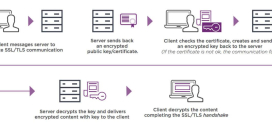
Port 443 is the default port for HTTPS — HTTP wrapped in a TLS-encrypted tunnel. When a browser connects to `https://example.com`, it opens port 443, performs a TLS handshake to verify the site’s SSL certificate and agree on encryption keys, and only then exchanges the actual web content.
The practical takeaway: port 80 is for HTTP, port 443 is for HTTPS. Most modern sites listen on both, then automatically redirect port 80 visitors to port 443 so that no traffic stays unencrypted. Browsers reinforce this by flagging plain-HTTP pages as “Not Secure.”
What are the common SSL/TLS ports?
Beyond the web, every protocol that needs encryption has an associated secure port. Here are the ones you will encounter most often.
| Port | Protocol | Service | Encryption model |
|---|---|---|---|
| 443 | HTTPS | Secure web traffic | Implicit TLS |
| 993 | IMAPS | Incoming email (IMAP over SSL) | Implicit TLS |
| 995 | POP3S | Incoming email (POP3 over SSL) | Implicit TLS |
| 465 | SMTPS | Outgoing email (SMTP over SSL) | Implicit TLS |
| 587 | SMTP submission | Outgoing email (with STARTTLS) | Explicit TLS / STARTTLS |
| 990 | FTPS | Secure file transfer (FTP over SSL) | Implicit TLS |
| 636 | LDAPS | Secure directory queries (LDAP over SSL) | Implicit TLS |
| 22 | SSH | Secure shell / SFTP | Always encrypted |
A quick note on port 22: SSH is not “SSL” in the strict sense — it uses its own encryption protocol rather than TLS — but it is included here because it is the secure, encrypted channel for remote administration and SFTP file transfers, and people often expect to see it alongside the secure ports.
Dedicated SSL port vs STARTTLS: which does your service use?
This is the distinction that causes the most confusion, and it is worth understanding clearly. There are two different ways a service can apply encryption.
Implicit TLS (a dedicated secure port)
With implicit TLS, the encryption begins immediately. The moment a client connects to the port, a TLS handshake starts — before any application data is sent. The port itself is “secure by definition.”
Ports 443 (HTTPS), 993 (IMAPS), 995 (POP3S), and 465 (SMTPS) all work this way. There is no plain-text phase at all; if your client connects without TLS, the connection simply fails.
Explicit TLS (STARTTLS on the standard port)
With explicit TLS, the client connects to the *standard, normally-plain* port and begins an unencrypted conversation. It then issues a STARTTLS command, which tells the server “upgrade this connection to encryption now.” If both sides agree, the rest of the session is encrypted.
This is how port 587 (mail submission) and port 143 (IMAP) typically operate. The connection starts plain and is *upgraded* to TLS mid-session.
Here is the insight that prevents most secure-port errors: there are two TLS models, and your client’s settings must match what the server expects. If you point an email client at port 465 but configure it for STARTTLS (explicit), the handshake never completes, because the server expects encryption to be present *immediately*. Likewise, if you use port 587 but set “SSL/TLS” (implicit) instead of “STARTTLS,” the connection stalls because the server is waiting for the plain-text STARTTLS command first. The error messages — “connection timed out,” “could not establish a secure connection” — rarely point at the real cause. Before debugging certificates or firewalls, confirm you have paired the right port with the right encryption model: 465 = implicit (SSL/TLS), 587 = explicit (STARTTLS).
How do I check if a port is using SSL?
The most reliable way to test whether a port is actually serving SSL/TLS is the `openssl s_client` command. It opens a TLS connection and prints the full certificate chain and handshake details.
To check a standard HTTPS port:
“`bash openssl s_client -connect example.com:443 “`
If TLS is working, you will see the server certificate, the certificate chain, the negotiated TLS version and cipher, and a `Verify return code: 0 (ok)` line. If the port is not running TLS — or is misconfigured — the command will hang or return a handshake error.
For a STARTTLS service, you must tell OpenSSL which protocol to upgrade, otherwise it will try implicit TLS and fail:
“`bash openssl s_client -starttls smtp -connect mail.example.com:587 openssl s_client -starttls imap -connect mail.example.com:143 “`
Other quick checks:
- In a browser, click the padlock icon to view the certificate served on port 443.
- `nmap` can scan which secure ports are open: `nmap -p 443,465,587,993,995 example.com`.
- `curl -v https://example.com` shows the TLS handshake in its verbose output.
Why must the firewall allow these ports?
Encryption is useless if the traffic never reaches the server. Both server-side and client-side / network firewalls must explicitly permit the secure ports you intend to use.
If port 443 is blocked, your website is unreachable over HTTPS even with a perfectly valid SSL certificate. If ports 993, 995, 465, or 587 are blocked, email clients cannot send or receive over encrypted connections — a frequent problem on restrictive corporate or public Wi-Fi networks. Hosting environments add another layer: the control panel firewall (such as CSF on cPanel servers) must list each secure port as allowed.
When a connection fails, the troubleshooting order is usually: (1) is the port open in the firewall, (2) is the right encryption model selected, (3) is the certificate valid. Checking them in that order saves a great deal of time.
Which ports do email clients need?
For a standard mail setup, configure your email client with one incoming and one outgoing secure port:
- Incoming mail: port 993 for IMAP over SSL (recommended — keeps mail synced across devices), or port 995 for POP3 over SSL (downloads and typically removes mail from the server).
- Outgoing mail: port 465 (implicit SSL/TLS) or port 587 (STARTTLS). Many providers now prefer 587, but both are widely supported — just match the encryption setting to the port as described above.
Always select SSL/TLS or STARTTLS in the client settings; never leave the connection on “None,” which sends your mail password in plain text.
Secure hosting and email ports, configured for you — DarazHost
Getting SSL ports right across web, email, and file transfer is exactly the kind of setup that should *just work* the moment you go live. DarazHost handles that configuration for you:
- HTTPS on port 443, ready out of the box — every site is set up for SSL/HTTPS with proper port 80 → 443 redirection, so visitors always land on the encrypted version.
- Free SSL certificates included with hosting, so you are not paying extra to secure your domain.
- Secure email ports pre-configured — IMAP (993), POP3 (995), and SMTP (465 / 587) over SSL are set up and documented for your mail clients.
- Correct firewall and port rules managed on our high-speed SSD hosting, so secure ports are open where they should be and locked down where they shouldn’t.
- 99.9% uptime and 24/7 technical support — if a port or certificate ever needs attention, real engineers are a message away, any time zone.
Whether you are launching a single website or running mail for a whole team, DarazHost ships the secure-port plumbing already in place. or .
Frequently asked questions
Is SSL port 443 the same as TLS? Port 443 is the *port number* used for HTTPS. The actual encryption on that port today is provided by TLS, not the older SSL protocol. The name “SSL port” persists for historical reasons, but a modern connection on port 443 negotiates TLS.
What is the difference between port 465 and port 587 for email? Both send outgoing mail. Port 465 uses implicit TLS — encryption starts immediately. Port 587 uses STARTTLS (explicit TLS) — the connection begins plain and is upgraded to encryption. Match your client’s security setting to the port: “SSL/TLS” for 465, “STARTTLS” for 587.
Why is my secure connection failing even though the port is correct? The most common cause is a mismatch between the port and the encryption model (for example, STARTTLS selected on an implicit-TLS port like 465). After that, check whether a firewall is blocking the port, then verify the certificate is valid and not expired.
Can I use the same port for HTTP and HTTPS? Not by convention. Port 80 serves HTTP and port 443 serves HTTPS. A server can listen on both simultaneously, and most are configured to redirect port 80 traffic to port 443 automatically so nothing stays unencrypted.
How do I know if a port supports SSL? Run `openssl s_client -connect host:port` for implicit-TLS ports, or add the `-starttls` flag (e.g. `-starttls smtp`) for STARTTLS ports. A successful handshake that returns the server certificate and `Verify return code: 0 (ok)` confirms SSL/TLS is active.