LiveChat
  Support
SQL Server Installation With Chef: Automating Database Deployments as Code
Installing a database server by hand works once. It rarely works the same way twice. The moment you need a second server, a staging clone, or a clean rebuild after an incident, manual steps become a liability. SQL Server installation with Chef turns that fragile, click-by-click process into versioned, repeatable code that any engineer or pipeline can run on demand.
This guide explains what Chef is, how its cookbooks and recipes automate database installation, why idempotency matters, and how the same pattern applies whether you are deploying Microsoft SQL Server on Linux or MySQL and MariaDB. By the end, you will understand the structure of an installation recipe and why automation beats manual setup at any scale beyond a single box.
Key Takeaways
• Chef is an infrastructure-as-code tool that describes server state in code (cookbooks and recipes), then enforces that state automatically.
• Database installs become idempotent: running the recipe many times produces the same result, never duplicate or broken installs.
• Attributes separate configuration (versions, ports, edition, paths) from logic, so one cookbook serves dev, staging, and production.
• The same pattern covers MS SQL Server on Linux, MySQL, and MariaDB via community or custom cookbooks.
• Automation delivers consistency, repeatability, and scale that manual installation cannot match.
What Is Chef and How Does Infrastructure as Code Work?
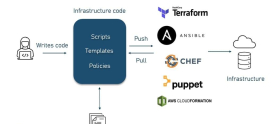
Chef is a configuration management tool that treats server setup as software. Instead of logging into a machine and typing commands, you write code that declares the desired end state: which packages exist, which services run, which files contain which content. Chef then compares the current state of the node to that declaration and makes only the changes required to converge on it.
This is the core idea behind infrastructure as code (IaC): your servers are defined in text files that live in version control, get reviewed in pull requests, and deploy through automation. The benefits map directly onto database work, where a small misconfiguration in collation, port binding, or service account can cause hours of debugging.
Chef organizes work into a few key concepts:
- Cookbook — the unit of distribution, a directory holding everything needed to configure one capability (for example, a database server).
- Recipe — a Ruby file inside a cookbook that lists resources in the order they should converge.
- Resource — a single declaration of desired state, such as a package to install or a service to enable.
- Attribute — a configurable value (version, port, edition) that customizes a recipe without editing its logic.
- Node — the server being managed, which carries its own attribute data.
The mental shift that trips up newcomers is this: a Chef recipe is not a script that *does* things top to bottom. It is a *description of the destination*. Chef figures out the route. A shell script that runs `apt-get install` twice may error or duplicate work; a Chef `package` resource that has already converged simply reports “up to date” and moves on. That distinction is what makes database automation safe to run on a cron schedule.
Why Automate Database Installation Instead of Doing It Manually?
A manual SQL Server install involves adding a Microsoft repository, importing a signing key, installing the engine package, accepting the license, setting the SA password, choosing an edition, configuring the firewall, and starting the service. Each step is a chance to deviate. Across ten servers, those deviations are guaranteed.
Automating the install with Chef solves three problems at once:
- Consistency — every server is built from the same code, so collation, ports, edition, and tooling match exactly. Drift between environments disappears.
- Repeatability — rebuilding a database server after hardware failure or a security incident becomes a single converge, not a day of remembering forgotten steps.
- Scale — provisioning the hundredth server costs the same effort as the first. The cookbook does not care how many nodes run it.
There is also an auditing benefit. Because the install lives in version control, you can see exactly who changed the SQL Server version, when, and why, with the full diff attached to a code review.
How Does Idempotency Protect Your Database Servers?
Idempotency means an operation produces the same result no matter how many times it runs. This is Chef’s defining trait and the reason it is trusted for production databases.
Consider a recipe that ensures the `mssql-server` package is installed and the service is running. The first converge installs it. The thousandth converge checks the state, finds it already correct, and changes nothing. You never risk a second installation corrupting the first, and you can safely schedule periodic runs to *correct drift* — if someone manually stops the service or changes a config file, the next Chef run quietly restores the intended state.
How Do Chef Cookbooks Install SQL Server and Other Databases?
The community ecosystem provides cookbooks for most database engines. For Microsoft SQL Server on Linux, recipes typically wrap the official Microsoft repository and the `mssql-server` package. For relational databases generally, the long-standing `database` cookbook offers resources for managing databases and users across MySQL, MariaDB, and PostgreSQL once the engine is installed.
The table below shows how the same conceptual steps map across engines:
| Step | MS SQL Server on Linux | MySQL / MariaDB |
|---|---|---|
| Add repository | Microsoft repo + GPG key | Distro repo or vendor repo |
| Install engine | `package ‘mssql-server’` | `package ‘mariadb-server’` |
| Set credentials | SA password via setup tool | root password via attribute |
| Configure service | `service ‘mssql-server’` enabled + started | `service ‘mariadb’` enabled + started |
| Open firewall | Allow TCP 1433 | Allow TCP 3306 |
| Manage databases | `mssql_database` resource (custom) | `database` resource (community cookbook) |
Notice that the *shape* of the work is identical. Only the package names, ports, and credential mechanics differ. Once you understand the pattern for one engine, you can apply it to any of them.
What Does a Database Installation Recipe Look Like?
Below is a simplified recipe structure for installing SQL Server on Ubuntu. It is illustrative rather than production-complete, but it shows how resources stack into a coherent install.
“`ruby
apt_repository ‘mssql-server’ do uri node[‘sql_server’][‘repo_uri’] key node[‘sql_server’][‘gpg_key’] components [‘main’] end
package ‘mssql-server’ do action :install end
execute ‘configure-mssql’ do command “/opt/mssql/bin/mssql-conf -n setup” environment( ‘ACCEPT_EULA’ => ‘Y’, ‘MSSQL_PID’ => node[‘sql_server’][‘edition’], ‘MSSQL_SA_PASSWORD’ => node[‘sql_server’][‘sa_password’] ) not_if { ::File.exist?(‘/var/opt/mssql/data/master.mdf’) } end
service ‘mssql-server’ do action [:enable, :start] end “`
A few things are worth highlighting:
- The `package` and `service` resources are idempotent by design — they only act when the node is not already in the declared state.
- The `execute` resource uses a `not_if` guard so the setup tool runs only on a fresh install, not on every converge.
- Every environment-specific value — repository URI, edition, SA password — comes from attributes, not hardcoded strings.
Why Use Attributes Instead of Hardcoding Values?
Attributes are Chef’s mechanism for separating *what to configure* from *how to configure it*. A matching attributes file keeps the recipe clean and reusable:
“`ruby
default[‘sql_server’][‘repo_uri’] = ‘https://packages.microsoft.com/ubuntu/22.04/mssql-server-2022’ default[‘sql_server’][‘gpg_key’] = ‘https://packages.microsoft.com/keys/microsoft.asc’ default[‘sql_server’][‘edition’] = ‘Developer’ default[‘sql_server’][‘sa_password’] = ‘set-via-encrypted-data-bag’ “`
In real deployments, secrets like the SA password should come from an encrypted data bag or a secrets manager rather than a plain attribute. The point stands: one cookbook serves your laptop, your staging cluster, and production by changing attribute values alone — the logic never changes.
Run Chef-Driven Database Deployments on DarazHost Infrastructure
Infrastructure as code only pays off when the underlying servers give you full control and stay online. DarazHost VPS and dedicated servers ship with full root access, so you can run Chef, Ansible, or any configuration management tooling to automate SQL Server, MySQL, and MariaDB deployments end to end. Our infrastructure is built for reliable, repeatable IaC workflows — clean base images, predictable networking, and the resources to converge nodes quickly. Backed by 24/7 expert support, DarazHost gives your automation pipelines a dependable foundation whether you are managing one database node or a fleet.
Chef vs Manual Installation: Which Should You Choose?
For a single throwaway test box, a manual install is fine. For anything you intend to keep, reproduce, or scale, automation wins decisively.
| Factor | Manual Install | Chef Automation |
|---|---|---|
| First server | Fast to start | Setup overhead upfront |
| Tenth server | Tedious, error-prone | Identical, effortless |
| Rebuild after failure | Reconstruct from memory | One converge |
| Configuration drift | Accumulates silently | Corrected on every run |
| Audit trail | None | Full version-control history |
| Onboarding new engineers | Tribal knowledge | Read the cookbook |
The upfront cost of writing a cookbook is real, but it is paid once. The cost of manual installation is paid *every single time*, and it compounds with every server and every engineer who has to learn the steps.
Frequently Asked Questions
Can Chef install SQL Server on Windows as well as Linux? Yes. Chef supports Windows nodes through resources like `windows_package` and PowerShell-based providers. The same recipe-and-attribute pattern applies; only the resources used to install and configure the engine change. Microsoft SQL Server on Linux is increasingly common for containerized and cloud-native workloads, which is why this guide focuses on it.
Is Chef better than a shell script for database installs? For one-off use, a shell script is simpler. For anything reused, Chef’s idempotency, attribute system, and drift correction make it far more reliable. A script runs blindly; Chef converges toward a declared state and skips work already done, which is much safer to re-run on a schedule.
Do I need the community database cookbook to manage databases? Not necessarily, but it helps. The community `database` cookbook provides resources for creating databases and users on MySQL, MariaDB, and PostgreSQL once the engine is installed. For SQL Server you may use custom resources or call the engine’s own tools. Either way, the installation pattern is the same.
How does Chef handle secrets like the SA password? Sensitive values should never sit in plain attributes or version control. Chef supports encrypted data bags, and many teams integrate an external secrets manager. The recipe references the secret by lookup, so the cookbook stays shareable while the actual password stays protected.
Does the same Chef pattern work for MySQL and MariaDB? Yes. The conceptual steps — add repository, install package, set credentials, enable service, open the port, manage databases — are identical across engines. You swap the package name (`mariadb-server` instead of `mssql-server`), the default port (3306 instead of 1433), and the credential mechanics. The structure stays the same.
Conclusion
SQL Server installation with Chef transforms database setup from a fragile manual ritual into versioned, idempotent, repeatable code. Cookbooks and recipes declare the desired state, attributes keep that code reusable across environments, and idempotency guarantees that re-running the install is always safe. The same pattern scales from a single node to a fleet and applies equally to MS SQL Server on Linux, MySQL, and MariaDB. Combined with reliable infrastructure and full root access, automation gives your team consistency at any scale — and the confidence to rebuild anything, anytime.