LiveChat
  Support
Dedicated Hosting in Boston: A Practical Guide for East-Coast Businesses
If you run a business in Boston, Cambridge, or the wider Massachusetts area, the question of where your servers live is more than a technical footnote. It touches latency for your local users, compliance with data-handling expectations, and the control you have over the infrastructure your applications depend on. This guide explains what dedicated hosting actually is, why proximity sometimes matters and sometimes doesn’t, and how to evaluate a provider honestly rather than chasing a city name on a map.
Key Takeaways
• Dedicated hosting gives you an entire physical server with full root control, no resource sharing, and stronger isolation than VPS or shared plans.
• Server location near Boston mainly helps applications where every millisecond counts (trading, gaming, real-time apps) and where data jurisdiction matters.
• For most websites and SaaS products serving a global audience, network quality and a good CDN matter far more than the data center’s exact city.
• When choosing a host, weigh network connectivity, hardware, security, uptime, and support over geography alone.
What Is Dedicated Hosting?
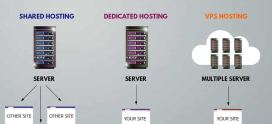
Dedicated hosting means leasing an entire physical server that no other customer shares. Every CPU core, gigabyte of RAM, storage device, and slice of network bandwidth belongs to you alone. This is the opposite of shared hosting, where hundreds of sites sit on one machine, and a step beyond VPS hosting, where you get guaranteed virtual resources but still share the underlying hardware.
Because nothing is shared, dedicated servers deliver predictable performance. There is no “noisy neighbor” consuming the disk I/O you were counting on during a traffic spike. You also get root-level access, meaning you control the operating system, the security stack, the software versions, and the tuning parameters end to end.
Dedicated vs VPS vs Cloud
Each model solves a different problem. The table below summarizes how they compare for a business deciding where to host a serious workload.
| Factor | Dedicated Server | VPS | Cloud (IaaS) |
|---|---|---|---|
| Resource isolation | Full physical isolation | Virtual partition, shared hardware | Virtual, shared hardware |
| Performance consistency | Highest, no contention | Good | Variable under load |
| Root/admin control | Complete | Complete (within the VM) | Complete (within the instance) |
| Scaling speed | Hardware-bound, slower | Moderate | Fastest, elastic |
| Cost model | Fixed monthly | Fixed monthly | Usage-based, can spike |
| Best fit | Steady, demanding workloads | Growing apps, mid-size sites | Bursty, unpredictable traffic |
There is no single winner. A predictable, resource-hungry workload often runs more cost-effectively on a dedicated server than on metered cloud, while a spiky, seasonal app may favor cloud elasticity.
Why Does Server Location Near Boston Matter?
Location influences three concrete things: latency, jurisdiction, and compliance.
Latency to Local Users
Latency is the round-trip time for data to travel between a user and your server. Physical distance sets a floor on that number, because signals cannot exceed the speed of light through fiber. A server physically near Boston will, all else equal, respond faster to a user in New England than a server in another region.
For most websites this difference is measured in a handful of milliseconds and is imperceptible. But for latency-sensitive applications, those milliseconds are the product:
- Real-time multiplayer gaming
- Financial and trading platforms where order timing matters
- Live video, voice, and collaboration tools
- High-frequency API services with tight response budgets
Jurisdiction and Compliance
Where a server physically sits determines which legal jurisdiction governs the data on it. For organizations handling regulated data, such as healthcare or financial records, keeping data within a specific country or state can simplify compliance and reassure customers. Choosing US-based hosting keeps your data under US jurisdiction, which many East-Coast businesses prefer for contractual and regulatory clarity.
Here is the part most “Boston hosting” pages won’t tell you: for a typical business website, the city printed on the data center brochure is one of the *least* important factors in real-world speed. A well-connected server in a major US network hub paired with a content delivery network will often outperform a poorly-connected server that happens to sit a few miles from your office. Proximity is a tie-breaker, not the headline. The headline is network quality.
What Are the Benefits of a Dedicated Server?
Beyond location, the dedicated model itself delivers advantages that shared and virtualized environments struggle to match.
Full Resources and Performance
You get every core, every gigabyte, and the full network interface. That means consistent throughput under load and headroom for demanding databases, rendering, analytics, or high-traffic e-commerce. Performance does not degrade because someone else on the box got busy.
Control and Customization
With root access you choose the OS, install any software stack, configure the kernel, and tune the server for your exact workload. Need a specific PHP version, a custom firewall ruleset, or a particular database engine? It’s your machine.
Security and Isolation
Physical isolation is a security feature. Your workload is not exposed to vulnerabilities introduced by other tenants, and you can implement dedicated firewall rules, intrusion detection, and hardening tailored to your risk profile. For businesses handling sensitive customer data, that isolation is often the deciding factor.
Who Actually Needs Boston or East-Coast US Hosting?
Be honest with yourself about your audience before you pay a premium for proximity.
- Local-first businesses: If the overwhelming majority of your users are in New England and your app is latency-sensitive, regional proximity is genuinely worth it.
- Compliance-driven organizations: If contracts or regulations require US data residency, location is non-negotiable.
- Low-latency applications: Gaming, trading, and real-time tools benefit measurably from being close to their users.
And who probably doesn’t need it? A business with a global or national audience. If your customers are spread across the country or the world, optimizing for Boston specifically can actually *hurt* users elsewhere. For these cases, a strong central network presence plus a CDN beats geographic single-mindedness every time.
How Do You Choose a Dedicated Hosting Provider?
When the city name matters less than you thought, what should you actually evaluate? Use this checklist.
| What to Evaluate | Why It Matters | Question to Ask |
|---|---|---|
| Network quality | Determines real-world speed more than location | What carriers and peering does the network use? |
| Hardware specs | Sets your performance ceiling | What CPU, RAM, and storage (NVMe SSD)? |
| Uptime guarantee | Protects revenue and reputation | Is there a 99.9% (or better) SLA? |
| Security & firewall | Shields you from attacks and breaches | Is DDoS and firewall protection included? |
| Support availability | Decides how fast issues get fixed | Is support truly 24/7 with real engineers? |
| Scalability path | Lets you grow without re-platforming | Can I upgrade resources or add a CDN easily? |
Notice that server location is not the first row. That ordering is deliberate. A great network and modern hardware will serve Boston users well even from a non-Boston facility, while a slow, poorly-supported server next door will frustrate them.
DarazHost Dedicated Servers: Power, Control, and Reach
If you’re weighing dedicated hosting for a Boston-area business, DarazHost offers powerful dedicated servers built to deliver exactly the consistency and control discussed above, wherever your users happen to be.
- Full root control so you can configure the OS, security stack, and software exactly to your workload.
- Dedicated resources, with every CPU core, gigabyte of RAM, and storage device reserved entirely for you, no noisy neighbors.
- Strong, well-connected network engineered for low real-world latency and stable throughput under load.
- Security and firewall protection to shield your applications from attacks and keep sensitive data isolated.
- 99.9% uptime so your services stay reachable for customers and revenue keeps flowing.
- 24/7 expert support from real engineers, not scripted tickets, whenever something needs attention.
And about that Boston question: rather than relying on a single city’s geography, DarazHost pairs strong US and global connectivity with CDN integration so your content is cached close to your visitors, serving users in any region, including Boston and the wider East Coast, with fast, consistent performance. That gives you the isolation and power of a dedicated server *and* the reach of a distributed delivery network.
Does the Data Center Location Really Matter for Global Reach?
For a genuinely global product, the honest answer is: less than you’d think. A single server, no matter how perfectly placed, is far from every user by definition. The professional approach is to decouple where your origin lives from where your content is delivered.
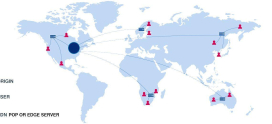
A content delivery network (CDN) caches static assets, and increasingly dynamic content, on edge nodes around the world. A user in Boston is served from a nearby edge node; a user in Singapore from theirs. Your dedicated server remains the authoritative origin, handling the work that truly needs it, while the CDN absorbs the geography problem.
This is why network quality plus CDN consistently beats raw proximity for global audiences. Optimize the origin for power and control, and let the delivery layer handle distance.
Frequently Asked Questions
Do I need a server physically in Boston to serve Boston customers well?
Not usually. Unless your application is highly latency-sensitive (gaming, trading, real-time tools) or bound by data-residency rules, a well-connected US server combined with a CDN will serve Boston users with fast, consistent performance. Network quality typically matters more than the exact city.
Is dedicated hosting better than VPS or cloud?
It depends on your workload. Dedicated hosting wins for steady, demanding workloads that need full resource isolation and predictable performance. VPS suits growing mid-size sites, and cloud excels at bursty, unpredictable traffic. Match the model to your traffic pattern, not to hype.
What does “full root control” actually give me?
Root access means you administer the entire server: operating system, software versions, firewall rules, and kernel tuning. You can install anything, harden the machine to your standards, and optimize it for your specific application without provider-imposed limits.
How does a CDN help if my server isn’t near my users?
A CDN caches your content on edge servers worldwide and serves each visitor from the node closest to them. This removes most of the distance penalty, so a single, powerful origin server can deliver fast experiences to users everywhere, including Boston, without needing a data center in every city.
What uptime should I expect from a dedicated host?
Look for a 99.9% uptime commitment or better, backed by an SLA. Combined with responsive 24/7 support, that level keeps your services reliably reachable and minimizes revenue-impacting downtime.